MC1311979 Digital signage support for Teams panels
Primary service: Teams
ChangePilot summary
- Microsoft Teams will support digital signage on idle Teams panel devices, enhancing branding and communication in shared spaces.
- Admins can configure digital signage settings at both tenant-wide and device-specific levels via the Teams Rooms Pro Management portal.
- This feature is compatible with third-party providers such as Appspace and XOGO, available with Teams Rooms Pro or Teams Shared Spaces licenses.
- Teams panels will show digital signage when idle, with configuration options for device groups and tenant-wide default settings.
- No user impact will occur unless the feature is enabled by admins.
Latest update: Image URL Change
History
Recorded changes
- Image URL Change
- Standard end: late August 2026 (previously mid-August 2026).
- The timeline for the rollout of the digital signage feature has been updated, with the general availability worldwide now beginning in early August 2026 and expected to complete by mid-August 2026. It was previously scheduled to begin in early July 2026 and expected to complete by mid-July 2026.
- The timeline for the rollout of the digital signage feature has been updated, with the general availability worldwide now beginning in early August 2026 and expected to complete by mid-August 2026. It was previously scheduled to begin in early July 2026 and expected to complete by mid-July 2026.
- The timeline for the rollout has been updated from early June 2026 to early July 2026, with completion expected by mid-July 2026 instead of mid-June.
Microsoft message
Updated August 17, 2026: We have updated the timeline. Thank you for your patience.
[Introduction]
Microsoft Teams is introducing support for displaying digital signage on idle Teams panel devices. This capability extends existing digital signage scenarios already available on Teams Rooms front-of-room displays, helping organizations deliver consistent branding and communications across shared spaces.
Admins can configure digital signage at both the tenant-wide and device-specific level through the Teams Rooms Pro Management portal. This feature supports select third-party providers such as Appspace and XOGO, and is available with Teams Rooms Pro or Teams Shared Spaces licenses.
This message is associated with Microsoft 365 Roadmap ID 558852.
[When this will happen:]
- General Availability (Worldwide): Rollout will begin in early August 2026 (previously early July) and is expected to complete by late August 2026 (previously mid-August).
[How this affects your organization:]
Who is affected:
- Admins managing Microsoft Teams Rooms and Teams panels
- Organizations using or planning to use digital signage in shared spaces
- Environments with Teams Rooms Pro or Teams Shared Spaces licenses
What will happen:
- Teams panels can support digital signage when idle.
- Admins can configure signage per device or device group. They can also configure default signage settings for the tenant.
- Configuration will be available in Teams Rooms Pro Management portal > Settings > Digital signage.
- Supported 3rd party providers include Appspace and XOGO.
- Available with Teams Rooms Pro or Teams Shared Spaces licenses.
- Feature is available by default for admins to configure.
- No user impact unless enabled.
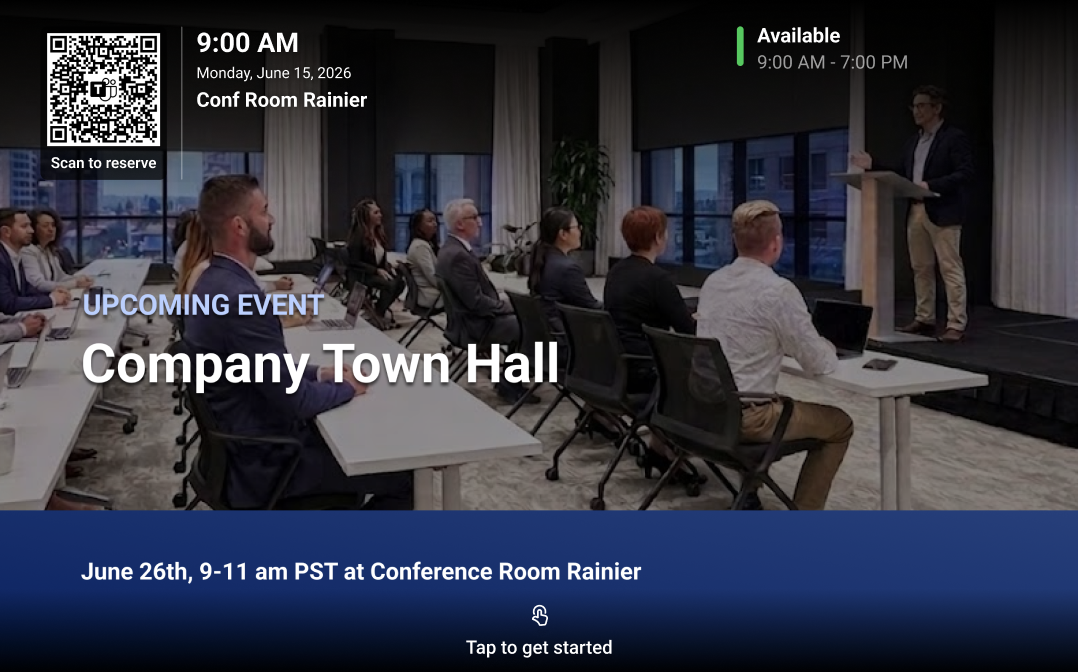
Screenshot 1: Example of digital signage on a Teams panel:
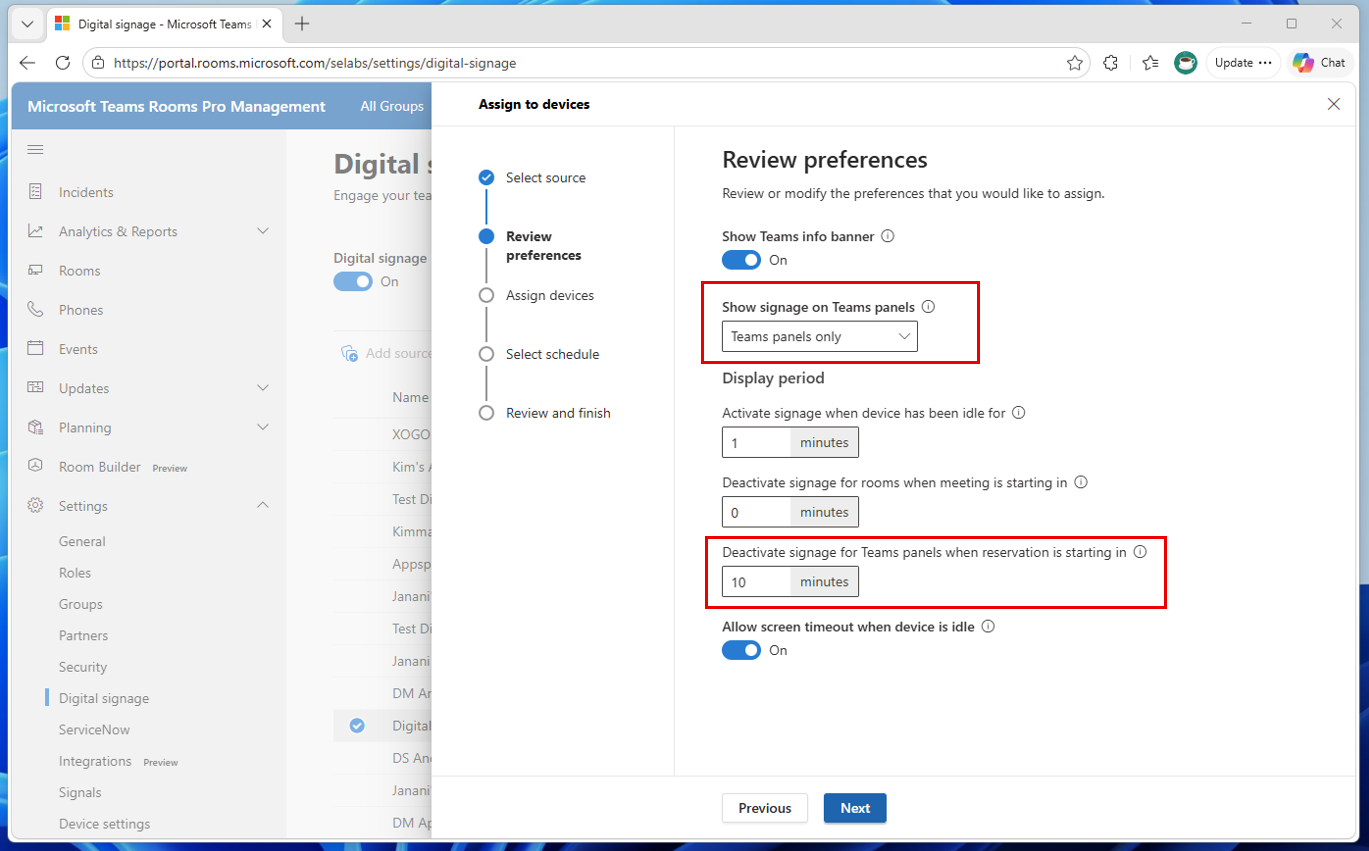
Screenshot 2: Example settings for configuring a digital signage source for Teams Panels specifically:
[What you can do to prepare:]
No immediate action is required before rollout.
- Review your current digital signage strategy for Teams Rooms and shared spaces.
- Plan content optimized for Teams panels:
- Recommended resolution: 1280 × 800
- Use separate digital signage sources for Teams panels and front-of-room displays:
- Teams panels have smaller displays than front-of-room screens.
- Content designed for larger displays may not render well on panels.
- Configure signage settings when available:
- Navigate to Teams Rooms Pro Management portal > Settings > Digital signage.
- Consider using separate signage content sources for:
- Front-of-room displays, and
- Teams panels (due to smaller screen size).
- To set up a digital signage source specifically for Teams panels, when assigning a signage source to devices, choose the Teams panels only option on the preference setting Show signage on Teams panels.
- Validate compatibility with supported partners (for example, Appspace or XOGO).
- Notify facilities or communications teams responsible for signage.
Learn more: Configure digital signage on Teams Rooms | Microsoft Learn (will be updated before rollout)
[Compliance considerations:]
| Compliance consideration | Explanation |
| Does the change add any integration to 3rd party software products? | Integrates with current third-party digital signage providers (Appspace, XOGO)
|
| Does the change include an admin control, and can it be controlled through Entra ID group membership? | Admin-controlled via Teams Rooms Pro Management portal |
More information
Details
In weekly changes
Platforms
- Android
- Teams and Surface Devices
Services
- Teams
Category
- Plan for change
Microsoft tags
- New Feature
- User Adoption
- Admin Action
Related changes
- 558852 Digital signage support for Teams panels Roadmap · Teams · Launched