MC1311978 Classic Outlook for Windows: User-initiated insights with Copilot
Primary service: M365 Copilot
ChangePilot summary
- User Initiated Insights in Copilot for classic Outlook allows users to highlight text in emails and get contextual insights from Copilot.
- The feature is integrated into Outlook and is enabled by default for eligible users.
- Organizations can restrict this feature by managing Copilot capabilities if desired.
- Existing Microsoft 365 security and compliance policies remain applicable.
- Users need to be informed about how to use the new functionality to benefit from it.
Latest update: Standard start: early October 2026 (previously early September 2026). Standard end: late October 2026 (previously late September 2026).
History
Recorded changes
-
- Standard start: early October 2026 (previously early September 2026).
- Standard end: late October 2026 (previously late September 2026).
-
- Standard start: early October 2026 (previously early September 2026).
- Standard end: late October 2026 (previously late September 2026).
Microsoft message
Updated September 1, 2026: We have updated the timeline. Thank you for your patience.
[Introduction]
We're introducing User Initiated Insights in Copilot for classic Outlook for Windows, enabling users to manually select text within an email and prompt Copilot to provide contextual insights. This enhancement gives users greater control over when and how Copilot assists them, improving productivity, clarity, and decision-making directly within their workflow.
This message is associated with Roadmap ID 508524.
[When this will happen:]
- Public Preview (Worldwide): We began rolling out in early May 2026 and expect to complete by late May 2026.
- General Availability (Worldwide): We will begin rolling out in early October 2026 (previously early September) and expect to complete by end of October 2026 (previously end of September).
[How this affects your organization:]
Who is affected:
- Users with Microsoft 365 Copilot capabilities
- Organizations using classic Outlook for Windows
What will happen:
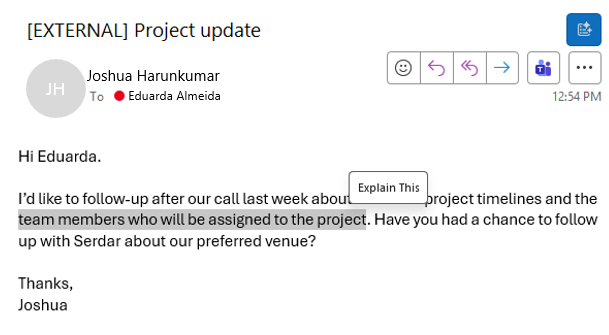
- Users will be able to highlight text in emails and invoke Copilot to generate insights.
- Functionality is built into the Outlook experience and does not require a separate add-in.
- The feature will be on by default for eligible users.
- Existing Microsoft 365 security, compliance, and data protection policies continue to apply.
Screenshot: When text is highlighted in an email, an Explain This button appears to provide additional context:
[What you can do to prepare:]
- If you do not want users to access this feature, remove or restrict Copilot capabilities.
- Verify users are running the latest version of classic Outlook for Windows.
- Inform helpdesk and support staff about this new Copilot interaction model.
- Communicate to users how to select text and invoke Copilot for contextual insights.
Learn more:
- How do I enable or disable Microsoft Copilot on MS 365 Premium | Microsoft Learn
- Instructions to turn off Copilot | Microsoft Support
[Compliance considerations:]
| Compliance area | Explanation |
| Introduces AI/ML capabilities interacting with customer data. | The feature enables Copilot to process user-selected email content to generate insights. |
| Provides a new way for users to interact with generative AI. | Users can invoke Copilot directly by selecting text within emails. |
| Allows users to enable or disable the feature at use time. | Users control invocation by choosing when to select text and engage Copilot. |
More information
Details
In weekly changes
Platforms
- Desktop
Services
- M365 Copilot Chat
Category
- Plan for change
Microsoft tags
- New Feature
- User Adoption
Related changes
- 508524 User-initiated Copilot insights in classic Outlook Roadmap · Outlook · Rolling out