MC1307512 AI-powered notes for in-person meetings with Facilitator in Teams Rooms on Windows
Primary service: Teams
ChangePilot summary
- Microsoft Teams is introducing AI-powered meeting notes with a Facilitator agent for Teams Rooms on Windows.
- Notes can be taken during in-person meetings without needing a scheduled meeting and will be securely stored in tenant-owned SharePoint.
- Users can access notes through the Teams Rooms console and view them in the meeting recap on the Teams desktop client.
- Automatic deletion of notes occurs if no participant is added during the note-taking session.
- Teams Rooms Pro licenses and certain tenant configurations are necessary for this feature to be available.
Latest update: Image URL Change
History
Recorded changes
-
- Timelines for the rollout of the feature have been delayed:
- Worldwide and GCC rollout will now start in early September 2026 and complete by late September 2026, instead of early August to late August 2026.
- GCC-H rollout is delayed to mid-September to mid-October 2026 from the previous schedule of mid-August to mid-September 2026.
- DoD rollout is postponed to mid-October to early November 2026 from mid-September to mid-October 2026.
- The timeline for the rollout has been postponed for all categories, including Worldwide and GCC, GCC-H, and DoD, with each phase now starting and completing roughly one month later than initially planned.
- The timeline for the rollout of the AI-powered meeting notes feature has been updated. The Worldwide and GCC rollout now begins in early July 2026 instead of late June and ends in late July 2026 instead of mid-July.
- The timeline for the rollout of the AI-powered meeting notes feature has been updated. The Worldwide and GCC rollout now begins in early July 2026 instead of late June and ends in late July 2026 instead of mid-July.
Microsoft message
Updated August 27, 2026: We have updated the timeline. Thank you for your patience.
[Introduction]
To support more effective in-person collaboration, Microsoft Teams is expanding AI-powered meeting notes with the Facilitator agent to Teams Rooms on Windows. This enhancement allows teams meeting in a physical room to capture real-time notes, decisions, and action items—without requiring a scheduled or hybrid meeting. The experience is designed to ensure notes are securely stored in your tenant while no data remains on the room device after the meeting ends.
This feature is associated with Microsoft 365 Roadmap ID 560318.
[When this will happen]
General Availability
- Worldwide and GCC: We will begin rolling out in late October 2026 (previously early September) and expect to complete by mid-November 2026 (previously late September).
[How this affects your organization]
Who is affected
- Organizations using Teams Rooms on Windows
- Rooms licensed with Teams Rooms Pro
What will happen
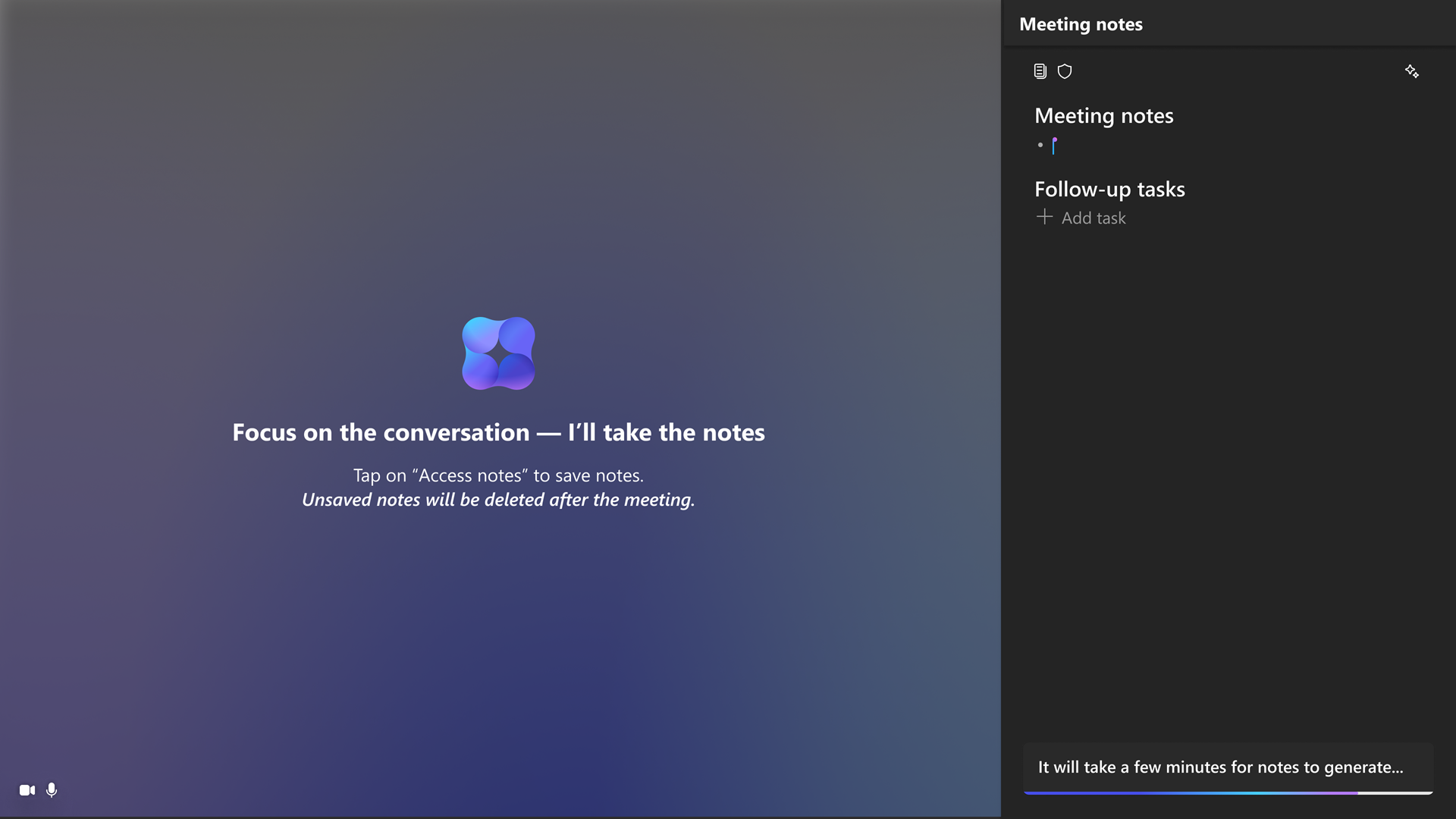
- During an in-person meeting, users can start AI-powered notes by selecting the Take notes button on the Teams Rooms console.
- Notes appear on the front-of-room display or touch board during the meeting:
- Notes are stored in tenant-owned SharePoint embedded storage.
- Access to notes requires adding your work account using the Access notes button on the Teams Rooms console:
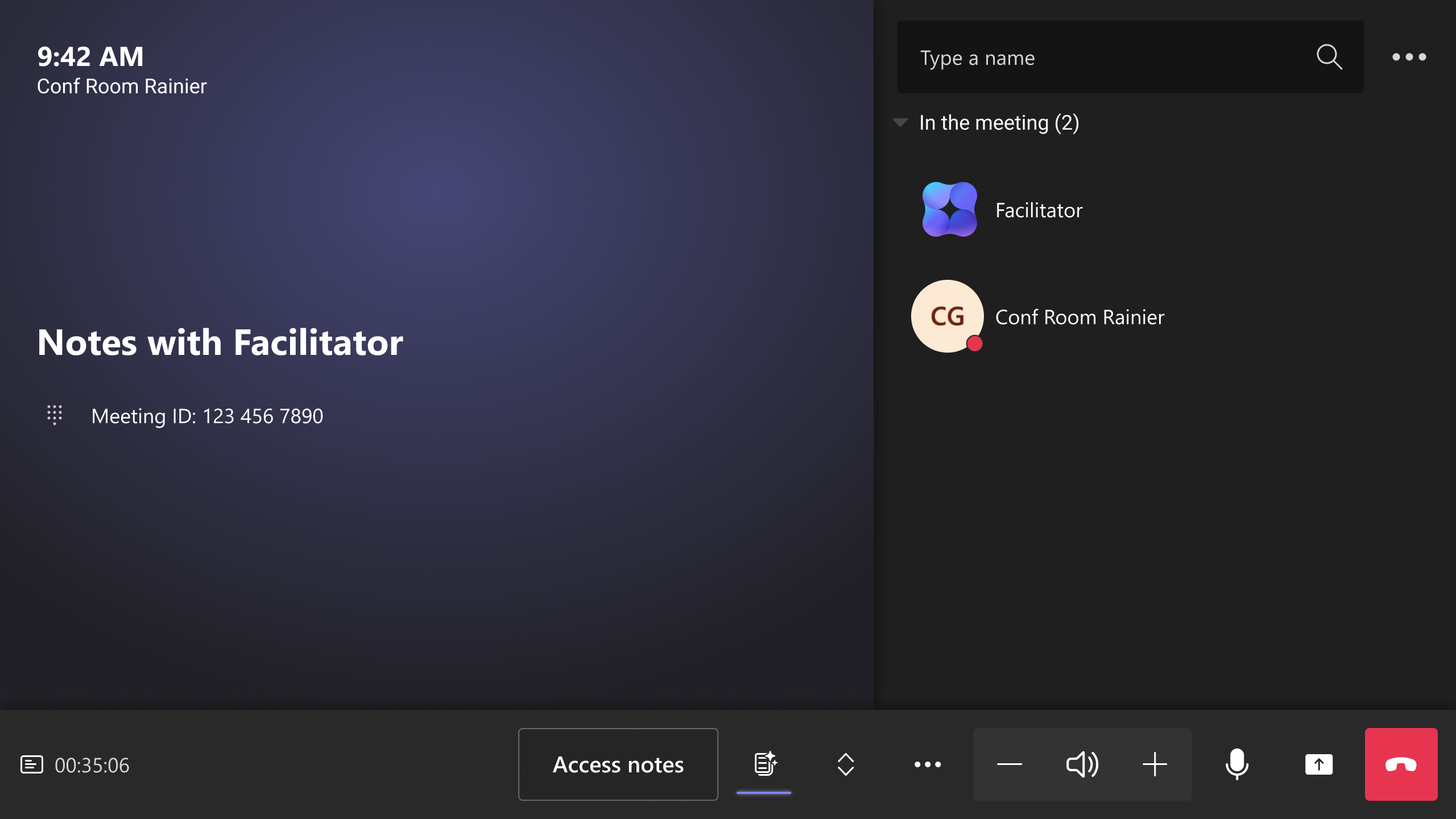
- After the meeting, notes can be viewed and edited by participants with access via the meeting recap in the meeting chat on the Teams desktop client.:
- If no participant was added during the note-taking session via Access notes, notes are deleted automatically.
Default state:
- The feature is available automatically once licensing and prerequisite configurations are met.
- No additional admin enablement is required beyond existing settings.
[What you can do to prepare]
No immediate action is required if your organization already meets the prerequisites.
To prepare:
- Confirm Teams Rooms Pro licenses are assigned to applicable rooms.
- Ensure Facilitator is enabled in your tenant.
- Verify Loop components are enabled:
IsLoopEnabledIsCollabMeetingNotesFluidEnabled
- Ensure meeting transcription is enabled in Teams meeting policies.
- Consider notifying helpdesk staff and users about:
- How to start notes in an in-person meeting
- Where notes are stored and accessed after the meeting
Learn more:
- Allow Facilitator in the Teams admin center - Set up Facilitator in Microsoft Teams | Microsoft Teams | Microsoft Learn
- Meetings - Admins- Manage transcription and captions for Teams meetings | Microsoft Teams | Microsoft Learn
- Settings management for Loop functionality in Teams - Admin policies for Loop components and Loop workspaces | Microsoft 365 | Microsoft Learn
[Compliance considerations]
| Question | Answer |
| Does the change store new customer data, and if so, where, and is the data cached or permanently stored? | Yes. Meeting notes generated by Facilitator are stored in tenant‑owned SharePoint Embedded storage. No meeting data is stored or cached on the Teams Rooms device after the meeting ends. |
| Does the change alter how existing customer data is processed, stored, or accessed (for example, documents, emails, or chats)? | Yes. Meeting audio and transcription data are processed to generate AI‑powered meeting notes, including summaries, decisions, and action items. Access to the notes occurs through the meeting recap in the meeting chat on Teams desktop client. |
| Does the change introduce or significantly modify AI/ML or agent capabilities that interact with or provide access to customer data? | Yes. The Facilitator agent uses AI to generate real‑time meeting notes, summaries, decisions, and action items based on in‑person meeting content. |
| Does the change provide users a new way of interacting with generative AI, and if so, how? | Yes. Users can initiate AI‑generated meeting notes during an in‑person meeting by selecting “Take notes” on the Teams Rooms console. |
| Does the change include an admin control, and can it be controlled through tenant configuration? | Yes. Availability of the feature depends on existing tenant settings, including Teams Rooms Pro licensing, Facilitator enablement, Loop component settings, and meeting transcription policies. |
More information
- www.microsoft.com/microsoft-365/roadmap?filters=&
- learn.microsoft.com/microsoftteams/facilitator-teams#1-allow-facilitator-in-the-teams-admin-center
- learn.microsoft.com/microsoft-365/loop/loop-admin-configuration?view=o365-worldwide#settings-management-for-loop-functionality-in-teams
- learn.microsoft.com/microsoftteams/meeting-transcription-captions#meetings
- learn.microsoft.com/microsoftteams/facilitator-teams#1-allow-facilitator-in-the-teams-admin-center
- learn.microsoft.com/microsoftteams/meeting-transcription-captions#meetings
- learn.microsoft.com/microsoft-365/loop/loop-admin-configuration?view=o365-worldwide#settings-management-for-loop-functionality-in-teams
Details
Platforms
- Teams and Surface Devices
Services
- Teams
Category
- Stay informed
Microsoft tags
- New Feature
- User Adoption
- Admin Action
Related changes
- 560318 AI-powered notes for in-person meetings with Facilitator in Teams Rooms on Windows Roadmap · M365 Copilot · Rolling out