MC1287365 Change in accessing additional agents in Excel
Primary service: M365 Apps
ChangePilot summary
- Chat-only Copilot experience in Excel is being updated for better alignment with editing.
- Users can access additional Copilot agents like Researcher or Analyst via the “…” menu.
- Copilot licensing and policy controls remain unchanged.
- Current workbook editing behavior and data permissions will not be affected.
- No admin action is required; inform support teams and update documentation as needed.
Latest update: Minor text change
History
Recorded changes
- The update status has changed from "paused rollout" to "updated timeline" with a rollout now planned for August 2026.
- The update status has changed from "paused rollout" to "updated timeline" with a rollout now planned for August 2026.
-
- The rollout of the Chat-only Copilot update in Excel has been paused.
- Communication regarding the new rollout date will be provided via the Message center instead of the specific dates initially given (late April 2026).
Microsoft message
Updated August 10, 2026: We have updated the content and timeline. Thank you for your patience.
[Introduction]
We are updating the Chat-only Copilot experience in Excel to better align with the editing experience. As part of this update, users who want to access additional Copilot agents (such as Researcher or Analyst) can do so by selecting the “…” menu in the header and choosing M365 Copilot.
[When this will happen]
- General Availability (Worldwide): We began rolling out early August 2026 and expect to complete by end of August 2026.
[How this affects your organization]
Who is affected
All Excel users with Microsoft 365 Copilot licenses
What will happen
- Users can continue to use the chat‑only Copilot experience in Excel to ask questions, analyze data, and receive insights without modifying workbook content.
- Users can click the "..." menu in the Excel header and then can choose "All Agents"
Screenshot - New All Agents button
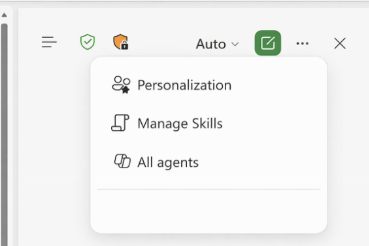
- The "All Agents" button will direct users to the Agent Store.
- Existing Microsoft 365 Copilot licensing and policy controls are respected.
- There is no change to workbook editing behavior or data permissions.
[What you can do to prepare]
No admin action is required.
- Inform helpdesk and support teams about the new access path to Microsoft 365 Copilot from Excel.
- Update internal documentation or training materials that describe Copilot experiences in Excel.
- Review Microsoft 365 Copilot documentation if you want to understand available agents and licensing requirements.
Learn more: Edit with Copilot in Excel | Microsoft Support
[Compliance considerations]
No compliance considerations identified. Review as appropriate for your organization.
More information
Details
Services
- M365 Apps
- M365 Copilot
Category
- Stay informed
Microsoft tags
- New Feature
- User Adoption
- Admin Action