MC1282567 Create charts on pages with AI in SharePoint
Primary service: M365 Copilot
ChangePilot summary
- Introduction of a new Charts web part with AI assistance in SharePoint for creating interactive charts using plain-language prompts.
- Designed to reduce time and effort in visualizing data on SharePoint pages, enhancing user experience.
- Requires a Microsoft 365 Copilot (Premium) license for access and usage of this feature.
- Available options for adding charts include using the AI agent chat pane or the web part toolbox.
- Changes can be made easily with follow-up prompts, and the feature is enabled by default for eligible users.
Latest update: Standard end: late September 2026 (previously late August 2026).
History
Recorded changes
- Standard end: late September 2026 (previously late August 2026).
- The completion date for General Availability has been extended from "late June 2026" to "end of July 2026."
- The completion date for General Availability has been extended from "late June 2026" to "end of July 2026."
-
- The timeline for the rollout of the new Charts web part with AI assistance in SharePoint has been updated.
- The Targeted Release is now scheduled to start in late May 2026 and finish by mid-June 2026, instead of early May to mid-May.
- The General Availability (Worldwide) will now commence in mid-June 2026 and end by late June 2026, revised from mid-May to late May.
Microsoft message
Updated September 14, 2026: We have updated the timeline. Thank you for your patience.
Introduction
We’re introducing a new Charts web part with AI assistance in SharePoint, designed to help page authors quickly create rich, interactive charts using plain-language prompts. This update reduces the time and effort needed to visualize data on SharePoint pages and enables more intuitive, AI-powered authoring experiences directly within SharePoint.
This message is associated with Microsoft 365 Roadmap ID 560076.
When this will happen:
- Targeted Release: Rollout begins in late May 2026 (previously early May) and is expected to complete by mid-June 2026 (previously mid-May).
- General Availability (Worldwide): Rollout begins in mid-June 2026 (previously mid-May) and is expected to complete by end of September 2026 (previously end of August).
How this affects your organization:
Who is affected:
- SharePoint page authors
- Tenants using SharePoint Online
- A Microsoft 365 Copilot (Premium) license is required to use this feature
What will happen:
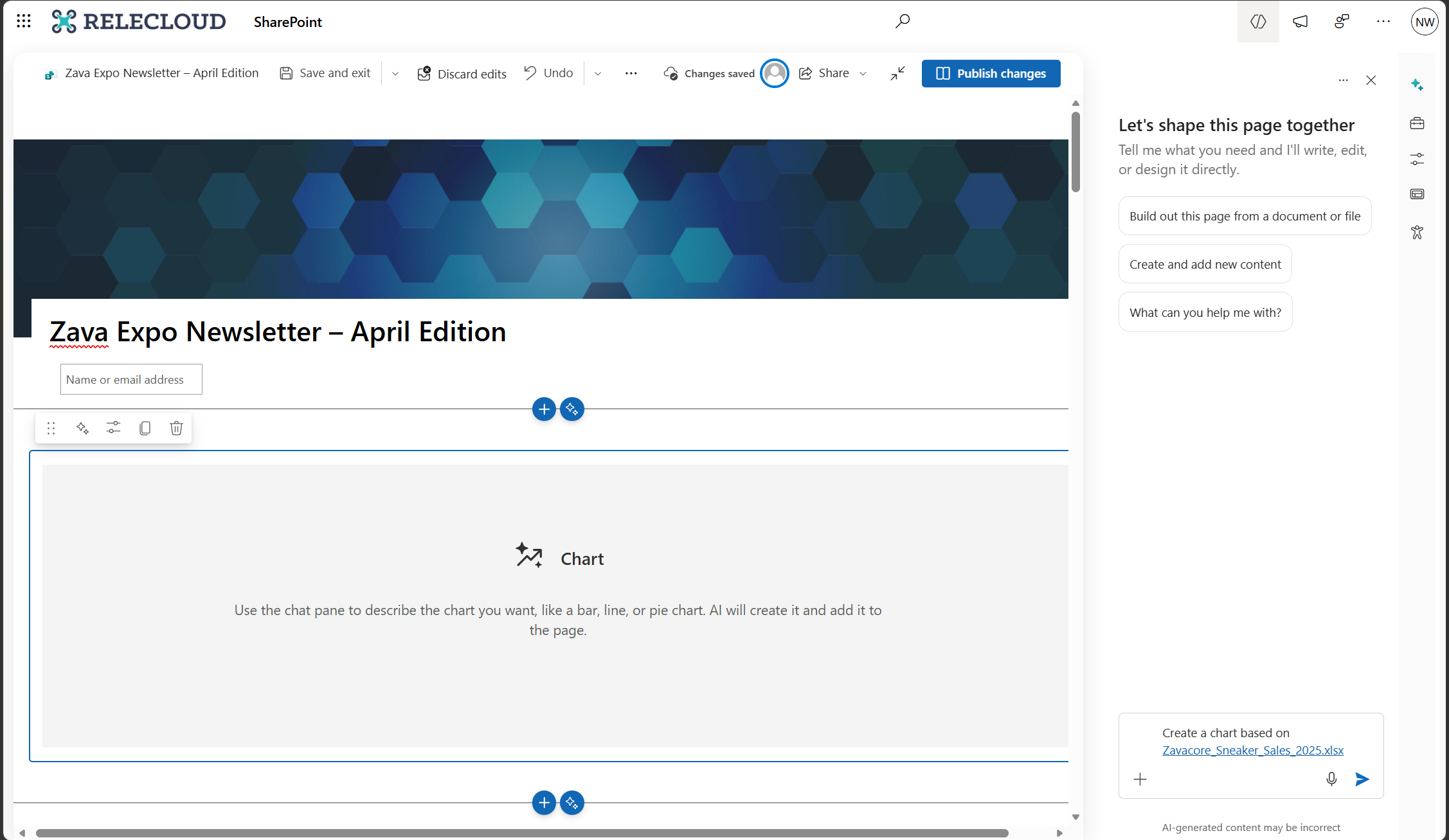
- While editing a SharePoint page, a Chart web part can be added in one of the following ways:
- Open the AI agent chat pane from the Agents coin icon in the upper-right navigation or the AI sparkle icon on the page toolbar.
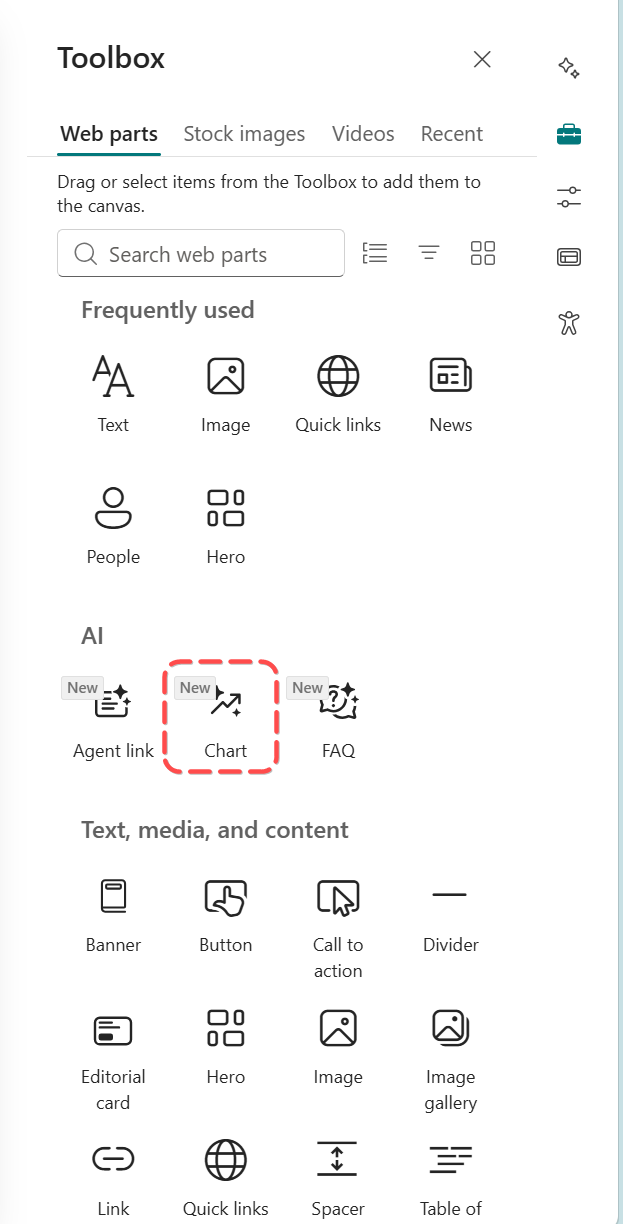
- Open the web part toolbox, search for Chart under the AI category, and add it to the page (this automatically opens the chat pane).
Screenshot 1: Entry point if adding a chart from the web part toolbox:
- Describe the chart to create using plain language, such as the data to visualize and the chart type. Relevant files can be attached to provide additional context.
- After the chart is created, follow-up prompts can be used to:
- Add, edit, or remove data
- Adjust the look and feel of the chart
- Changes can be reverted at any time using the Undo button in the command bar.
- The feature is enabled by default for users with a Microsoft 365 Copilot license, and existing SharePoint permissions and Microsoft 365 policies continue to apply.
Screenshot 2: Prompt to add a chart through the chat pane:
What you can do to prepare:
No action is required.
- Optionally inform SharePoint authors of the new capability.
- Update internal documentation if you provide SharePoint or Copilot guidance.
- Review Copilot licensing assignments to confirm which users will have access.
Learn more: Create a chart on pages with AI in SharePoint | Microsoft Support
Compliance considerations:
This change introduces a new way for users to interact with generative AI by using natural language prompts to create and edit charts in SharePoint pages.
More information
Details
In weekly changes
Platforms
- Web
Services
- M365 Copilot
- SharePoint
Category
- Stay informed
Microsoft tags
- New Feature
- User Adoption
Related changes
- 560076 Create charts on pages with AI Roadmap · SharePoint · Launched