MC1269211 Clearer RSVP selection in Outlook Mobile
Primary service: Exchange
ChangePilot summary
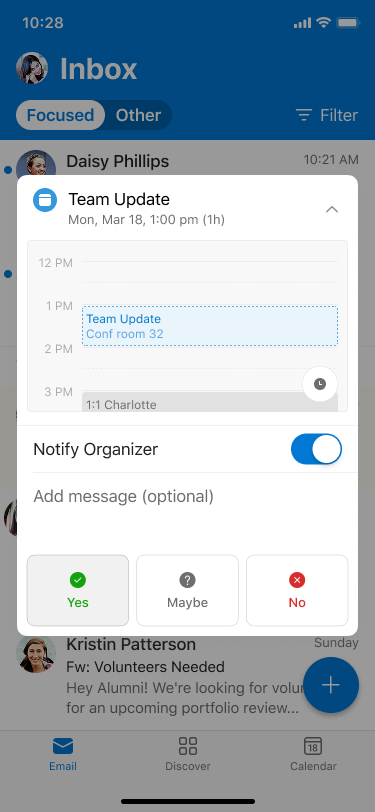
- The RSVP experience in Outlook Mobile will be improved with visual highlights for selected responses (Yes, Maybe, or No).
- All users of Outlook Mobile on iOS and Android will experience this change.
- The selected RSVP option will be prominently displayed, allowing users to quickly confirm their responses and make edits if needed.
- This feature will be enabled by default with no changes to existing meeting workflows or policies.
- No admin action is required, but notifying helpdesk staff and updating internal documentation may be beneficial.
Latest update: Image URL Change
History
Recorded changes
- The update timeline for the new RSVP feature in Outlook Mobile has been postponed. It now begins rollout in mid-September 2026 and is expected to complete by mid-October 2026, whereas previously it was scheduled to start in August and finish by the end of August.
- The update timeline for the new RSVP feature in Outlook Mobile has been postponed. It now begins rollout in mid-September 2026 and is expected to complete by mid-October 2026, whereas previously it was scheduled to start in August and finish by the end of August.
- The rollout timeline has been updated to begin in August 2026, previously scheduled for end of June 2026, and completion is now expected by end of August 2026, previously end of July 2026.
- The timeline for the rollout has been revised, now beginning at the end of June 2026 and expected to complete by the end of July 2026, instead of starting in early June and completing by the end of June 2026 as previously stated.
- The timeline for the rollout has been revised, now beginning at the end of June 2026 and expected to complete by the end of July 2026, instead of starting in early June and completing by the end of June 2026 as previously stated.
- The timeline for the rollout of the RSVP experience improvement in Outlook Mobile has been updated. The start date has shifted from late April 2026 to early June 2026, and the expected completion has changed from early June 2026 to the end of June 2026.
- The timeline for the rollout of the RSVP experience improvement in Outlook Mobile has been updated. The start date has shifted from late April 2026 to early June 2026, and the expected completion has changed from early June 2026 to the end of June 2026.
Microsoft message
Updated August 4, 2026: We have updated the timeline. Thank you for your patience.
[Introduction]
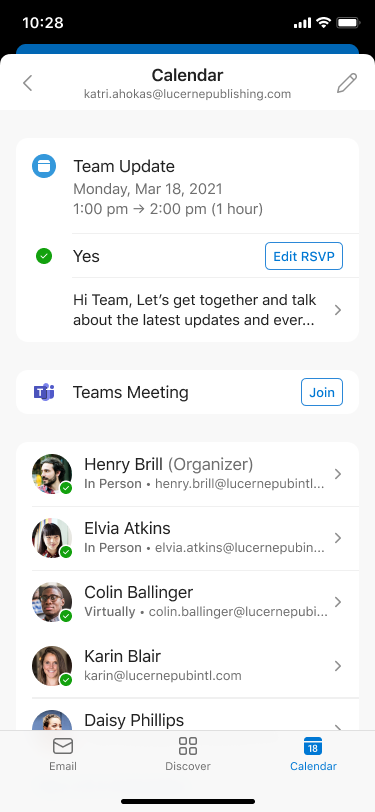
We’re improving the RSVP experience in Outlook Mobile by visually highlighting the response a user has selected (Yes, Maybe, or No). This makes it easier for users to quickly see how they’ve responded to a meeting invitation.
[When this will happen:]
General Availability (Worldwide, GCC, GCC High): Rollout begins mid-September 2026 (previously August) and is expected to complete by mid-October 2026 (previously end of August).
[How this affects your organization:]
Who is affected:
- All users who access Outlook Mobile on iOS or Android
- Applies to Worldwide, GCC, and GCC High tenants
What will happen:
- The selected RSVP option (Yes, Maybe, or No) will be visually highlighted
- Users can quickly confirm how they responded to a meeting invitation and edit as needed
- The feature is enabled by default
- No changes to existing meeting workflows or policies
- No impact to Outlook on the web or Outlook desktop clients
[What you can do to prepare:]
- No admin action is required; the update will roll out automatically
- Consider notifying helpdesk staff of the visual change
- Update internal documentation if needed
[Compliance considerations:]
No compliance considerations identified, review as appropriate for your organization.
Details
Services
- Exchange
Category
- Stay informed
Microsoft tags
- Feature Update
- User Adoption