MC1269210 Classic Outlook: Retirement of people card expanded view
Primary service: Outlook
Microsoft has marked this change as cancelled (14 Sept 2026).
ChangePilot summary
- The expanded view of the people card in Classic Outlook will be retired, leaving only the standard contact card available.
- Users accessing the expanded view will transition to the standard contact card, which lacks certain features like local time and customization options.
- Users depending on features from the expanded view are encouraged to use Outlook on the web or New Outlook for a richer experience.
- No admin action is needed; however, organizations should notify users and update relevant documentation.
Latest update: Change now cancelled.
History
Recorded changes
- Change now cancelled.
- There is an update indicating that the rollout of this change has been paused, and will be communicated once ready to proceed.
- There is an update indicating that the rollout of this change has been paused, and will be communicated once ready to proceed.
Microsoft message
Updated September 14, 2026: We have decided not to move forward with this change at this time. We apologize for any inconvenience.
[Introduction]
The people card experience in Classic Outlook is simplifying. As part of this update, the people card expanded view in Classic Outlook will be retired. This change streamlines the experience and ensures consistency with other Office applications where only the standard contact card is available.
[When this will happen:]
- We have decided not to move forward with this change at this time.
[How this affects your organization:]
Who is affected:
- Users who use Classic Outlook and access the people card expanded view.
What will happen:
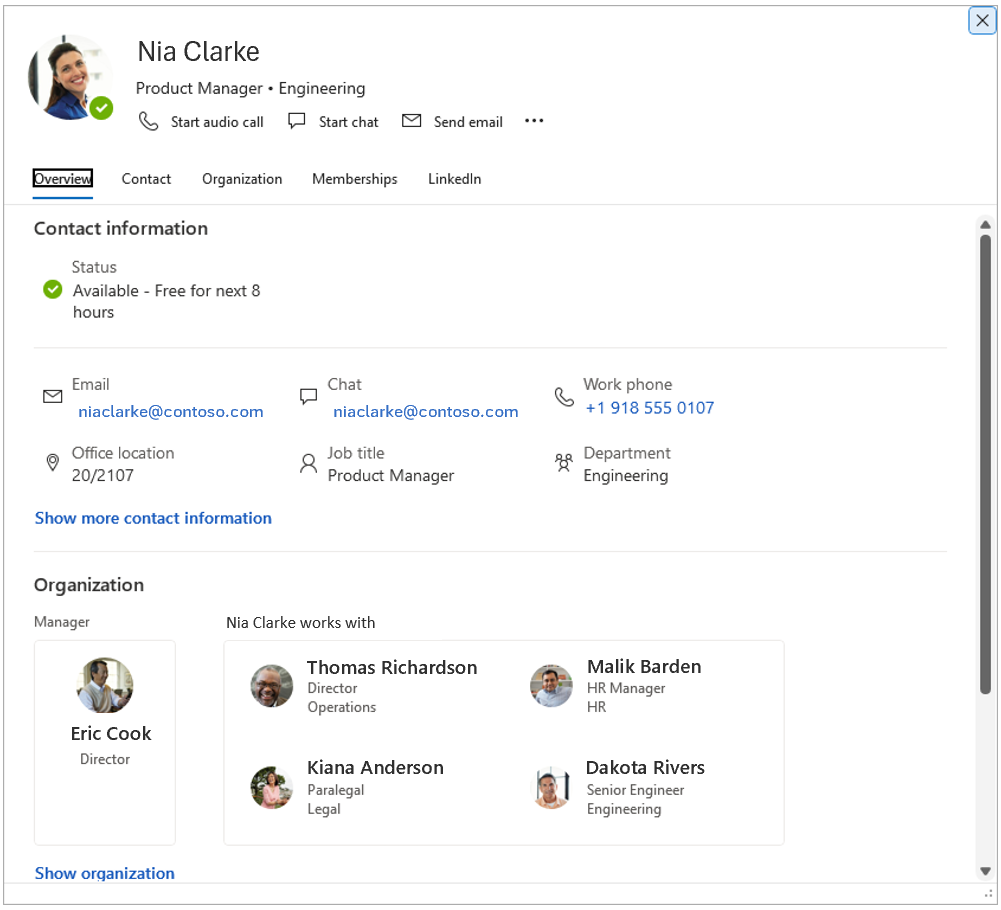
- The people card expanded view in Classic Outlook will be retired.
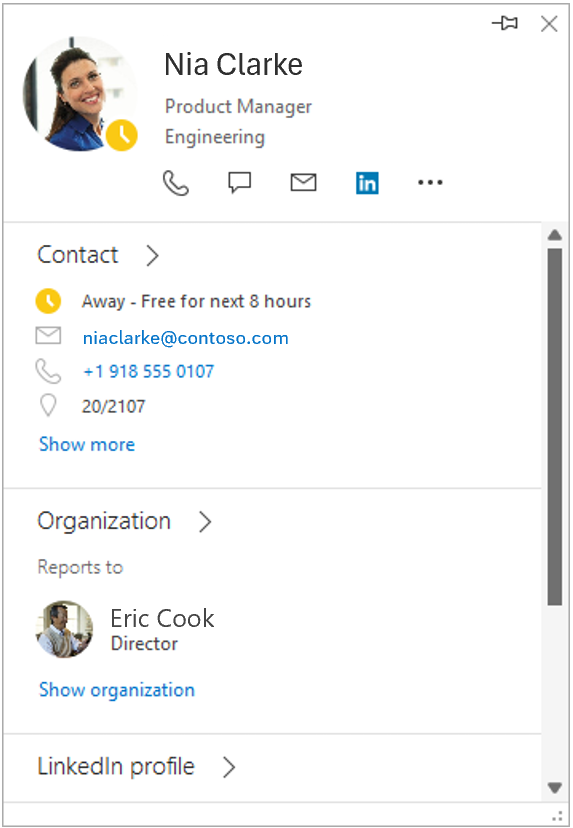
- Only the standard contact card view will be available in Classic Outlook.
- Users will continue to find the standard contact card when hovering over a recipient. This experience already exists in other Office applications and in some Outlook configurations today.
- Today, users can access the expanded view in Classic Outlook by right‑clicking an email recipient and selecting Open contact card, or by double‑clicking an email recipient. After retirement, these same actions will display the standard contact card instead.
- The standard contact card does not include the following features that were available in the expanded view:
- Local time
- “Works with” in the organization chart
- Change picture entry point (accessible from Outlook by selecting File, then clicking the Change link under your photo)
- Users who rely on these features can use Outlook on the web or New Outlook, which provide a richer people card experience.
- The expanded view being retired was not customizable. Any customizations made to the standard contact card will remain after this change.
[What you can do to prepare:]
- No admin action is required; this change will occur automatically.
- Notify users about the retirement of the people card expanded view in Classic Outlook.
- Update internal documentation or helpdesk guidance, if applicable.
- Encourage users who rely on features such as local time, works with, or changing profile pictures to use Outlook on the web or New Outlook.
Admins and users who want to familiarize themselves with the standard contact card experience can test it in Office apps where this change already exists. For example:
- Open Word and author some text.
- Save the file to OneDrive.
- Right-click text and select New comment.
- Add a comment, @mention yourself or another user, and select the mentioned name.
- Select Contact, Organization, or Membership to view the abbreviated people card.
Learn more
- Profile cards in Microsoft 365 | Microsoft Support
- Manage your contacts in Outlook for Windows | Microsoft Support
- Customize the profile card in Win32 apps using registry keys | Microsoft Support
[Compliance considerations:]
No compliance considerations identified, review as appropriate for your organization.
More information
- support.microsoft.com/office/profile-cards-in-microsoft-365-e80f931f-5fc4-4a59-ba6e-c1e35a85b501
- support.microsoft.com/office/manage-your-contacts-in-outlook-for-windows-f03681a5-fe07-4f2c-bee6-d93d8fab0c00
- support.microsoft.com/office/customize-the-profile-card-in-win32-apps-using-registry-keys-449afd21-6e5e-4b1f-8051-6515630d7537
Details
In weekly changes
Services
- Outlook
Category
- Plan for change
Microsoft tags
- User Adoption
- Retirement