MC1244281 Microsoft Purview | Insider Risk Management - Ability to preview content in Insider Risk Management Alerts
Primary service: Purview
ChangePilot summary
- A new Content preview tab will be added in Insider Risk Management alerts, allowing investigators to view potentially risky content without creating a case.
- Only users with Investigator permissions can access the content preview feature.
- Supported activities for preview include interactions with content from SharePoint, OneDrive, and Exchange.
- This feature is enabled by default for organizations licensed for Insider Risk Management.
- No actions are required from administrators to enable this feature, but it's advised to update internal investigation workflows and inform relevant teams.
Latest update: Image URL Change
History
Recorded changes
- The timeline for the General Availability rollout has been updated, changing from mid-June to early July and completion from late July to late August 2026.
Microsoft message
Updated June 17, 2026: We have updated the timeline. Thank you for your patience.
[Introduction]
We’re adding the ability to preview content directly within Insider Risk Management (IRM) alerts in Microsoft Purview. This enhancement removes the need to create a case to view potentially risky content, helping investigators quickly evaluate alerts and accelerate triage. This feature aligns with customer feedback requesting faster, more streamlined investigation workflows.
This message is associated with Microsoft 365 Roadmap ID 557189.
[When this will happen:]
- Public Preview: Rolling out in early April 2026 and expected to complete by late April 2026.
- General Availability (Worldwide, GCC, GCC‑High, DoD): Rolling out in early July 2026 (previously mid‑June) and expected to complete by late August 2026 (previously late July).
[How this affects your organization]
Who is affected:
- Organizations using Microsoft Purview Insider Risk Management.
- Only users with Investigator permissions will have access to content preview.
What will happen
- A new Content preview tab will appear within activity details in IRM alerts:
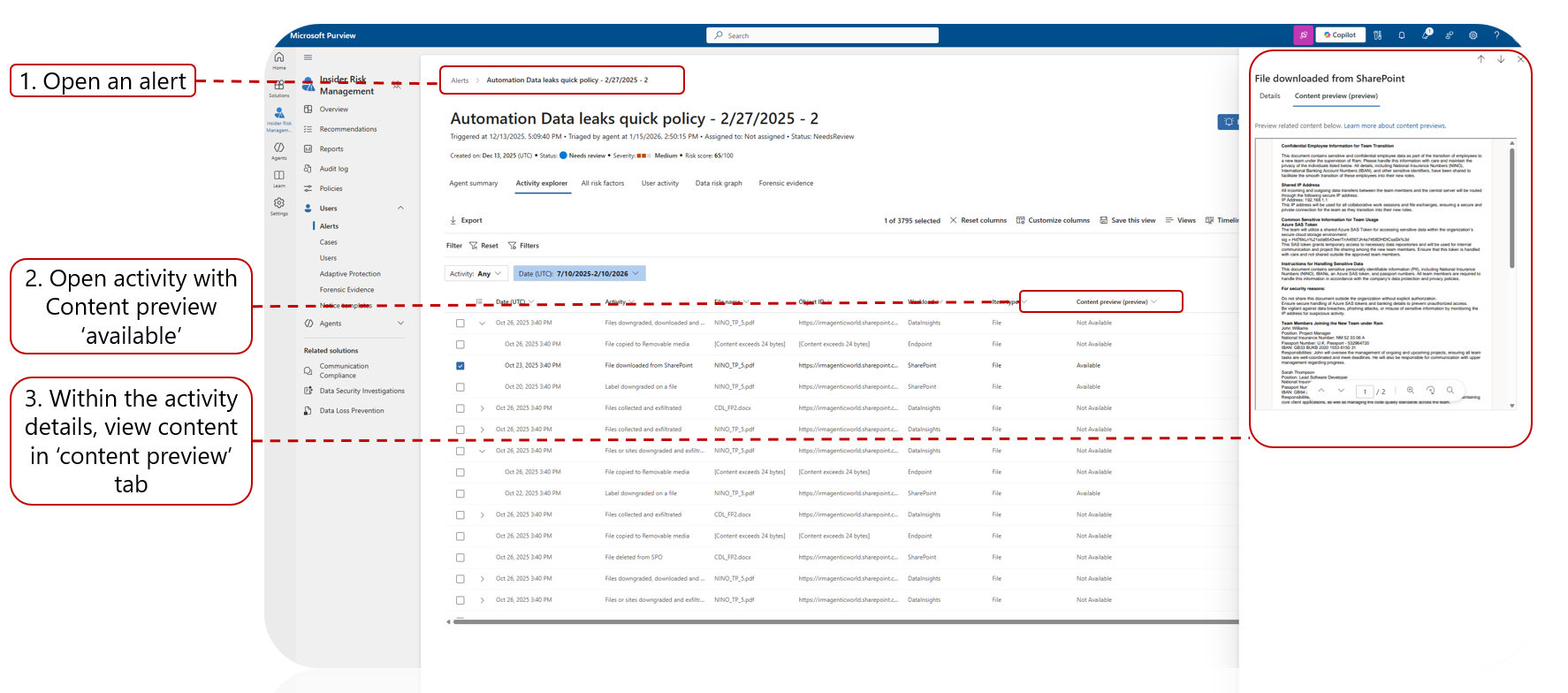
- Investigators will be able to view supported content directly from the alert without creating a case.
- Supported activity types include:
- Viewing, downloading, syncing, or sending activities involving content from SharePoint, OneDrive, or Exchange.
- Unsupported activity types include:
- State changes, permissions changes, deletions, and Endpoint activities.
- The feature is enabled by default for tenants licensed for Insider Risk Management.
- No impact on end‑user experience outside of investigators handling alerts.
[What you can do to prepare]
No action is required to enable this feature.
If your organization uses IRM for investigations, you may want to:
- Confirm which users hold Investigator permissions.
- Update internal investigation workflows or playbooks to reflect new alert‑level content preview.
- Inform your security operations or compliance teams of the new capability.
- Review supported content preview scenarios documented here:
- Learn more about investigating alerts in Insider Risk Management.
- To use content preview when available:
- Navigate to Insider Risk Management.
- Open Alerts.
- Select an alert.
- Open an activity marked as content preview available.
- View content in the Content preview tab.
Learn more: Investigate Insider Risk Management activities | Microsoft Purview | Microsoft Learn
[Compliance considerations]
No compliance considerations identified. Review as appropriate for your organization.
More information
Details
Platforms
- Web
Services
- Purview
Category
- Stay informed
Microsoft tags
- New Feature
- User Adoption
- Admin Action
Related changes
- 557189 Insider Risk Management - Ability to preview content in Insider Risk Management Alerts Roadmap · Purview · Launched