MC1239932 Collaborate with Copilot in Outlook while drafting email
Primary service: M365 Copilot
ChangePilot summary
- A new drafting experience in Outlook allows users to collaborate with Microsoft 365 Copilot while composing emails.
- Users with a Microsoft 365 Copilot license will see a side-by-side drafting feature and can work with Copilot in real time.
- The feature is enabled by default for licensed users without needing any administrative action.
- Existing email access and governance policies remain unchanged; no modifications to admin controls are necessary.
- Preparing for this change may involve updating internal training materials and reviewing new help documentation.
Latest update: Image URL Change
History
Recorded changes
- The updated content specifies that users can now iterate with Copilot in a chat next to the compose view, rather than only within the compose window.
- The updated content specifies that users can now iterate with Copilot in a chat next to the compose view, rather than only within the compose window.
Microsoft message
Updated August 27, 2026: We have updated the content. Thank you for your patience.
[Introduction]
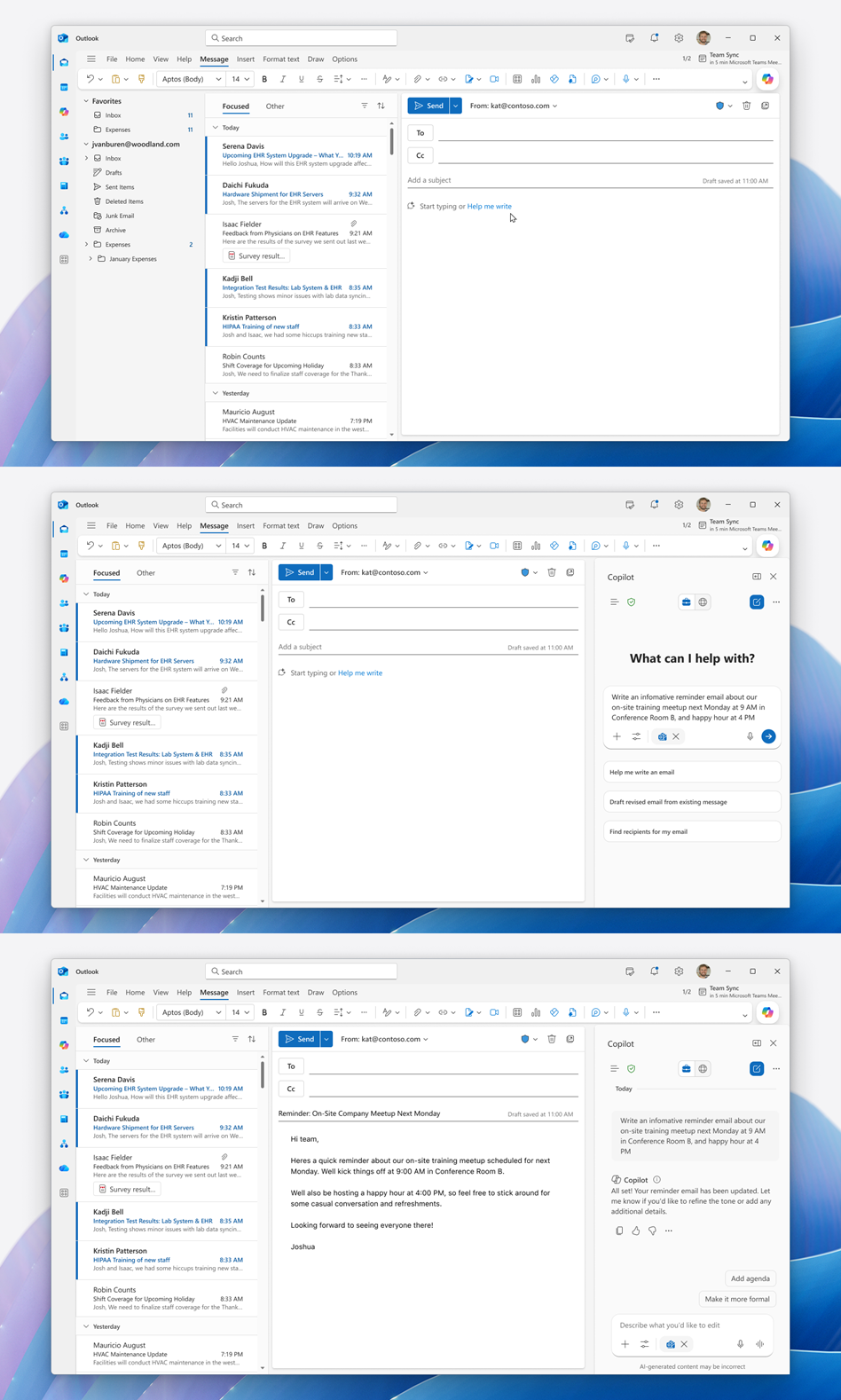
We’re introducing a new drafting experience in Outlook that enables users to collaborate directly with Microsoft 365 Copilot while composing email. This experience helps users move from a blank message to a polished draft more efficiently by allowing them to iterate with Copilot in chat next to the compose view, while staying in full control of the final content.
[When this will happen]
- General availability (Worldwide): Rollout will begin in early March 2026 and is expected to complete by late April 2026.
- Initial availability includes Outlook on the web and the new Outlook for Windows, with Outlook for iOS, Android, and Mac following shortly. Support for classic Outlook for Windows will arrive later in 2026.
- A new update for draft collaboration is rolling out (available on Outlook iOS/Android) and is expected to complete by end of September 2026.
[How this affects your organization]
Who is affected
- Users in your organization who have a Microsoft 365 Copilot license and use Outlook on supported clients.
What will happen
- Users will see a new Copilot side‑by‑side drafting experience when composing email
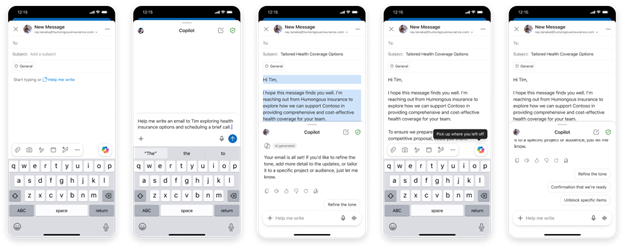
- Users can collaborate with Copilot in real time to refine, expand, or rewrite content directly within the compose surface:
- The experience is enabled by default for licensed users.
- Existing policies related to email access, governance, and protection continue to apply; there are no changes to admin controls at this time.
- There is no change to existing workflows outside the compose experience.
We’re also enabling people to select a specific piece of their draft to collaborate with Copilot chat on so they can focus on editing just that. We’ve now integrated the rewrite and coaching experiences into chat, so that you can more closely work back and forth with Copilot and ask follow up questions along the way to get to the draft you love. This update is now at 100% WW on Outlook iOS/Android. It is rolling out on Outlook Mac, new Windows, and Web, and is expected to reach 100% WW on those endpoints by end of September.
[What you can do to prepare]
No action is required.
You may choose to:
- Update internal training materials to help users understand this new drafting experience.
- Review upcoming Learn and help documentation as it becomes available.
[Compliance considerations]
No compliance considerations identified. Review as appropriate for your organization.
Details
Services
- M365 Copilot
- Outlook
Category
- Stay informed
Microsoft tags
- New Feature
- User Adoption
- Admin Action