MC1239928 Microsoft Teams VDI: Retirement of WebRTC optimization and transition to SlimCore-based optimization (Windows endpoints)
Primary service: Teams
ChangePilot summary
- Legacy WebRTC-based media optimization for Microsoft Teams on Windows VDI endpoints will be retired, transitioning to a new SlimCore-based optimization.
- This change affects only Windows-based endpoints using Citrix, Azure Virtual Desktop, or Windows 365, and does not impact other platforms.
- Users will experience a dismissible banner alert in August 2026, followed by a non-dismissible modal dialogue in February 2027.
- Automatic transition to the new optimization will occur with no admin configuration needed, and legacy optimization policies will no longer take effect after retirement.
- Benefits of the new optimization include advanced meeting features, improved diagnostics, and simplified updates.
Latest update: Image URL Change
History
Recorded changes
No changes recorded since ChangePilot first saw this post.
Microsoft message
[Introduction]
To improve meeting quality, reliability, and supportability in virtualized environments, Microsoft is retiring the legacy WebRTC-based media optimization for Microsoft Teams on Windows VDI endpoints and transitioning all customers to the new VDI optimization (SlimCore-based).
The new VDI optimization for Windows endpoints uses the same media engine as the native Microsoft Teams desktop client, enabling advanced meeting capabilities, reduced call set up times, better diagnostics, and simplified servicing while eliminating dependency on third-party WebRTC components.
This change applies only to Windows-based endpoints connecting to Citrix and Azure Virtual Desktop (AVD) / Windows 365 published desktop environments and does not affect macOS, Linux, mobile, HTML5, or other endpoint platforms.
For Windows-based endpoints that access Teams virtualized as a standalone or seamless app (also known as Remote App or Published App), a separate Message Center Post will be issued.
[When this will happen]
The retirement will occur in two phases in all environments:- End of Support: August 1, 2026 – September 30, 2026
- Users see dismissible banners alerting about the upcoming change. Then, on October 1, 2026, WebRTC remains functional but is no longer supported.
- End of Availability: February 1, 2027 – March 30, 2027
- Users see a modal dialogue window alerting about the upcoming change. Then, on April 1, 2027, WebRTC stops working; the new optimization is enforced. If Teams fails to optimize, it will fall back to server-side rendering
[How this affects your organization]
Who is affected:
- Organizations using Microsoft Teams in VDI on Windows endpoints
- Specifically:
- Citrix Virtual Apps and Desktops with 'HDX Media Optimization'
- Azure Virtual Desktops with 'AVD Media Optimization'
- Windows 365 with 'AVD Media Optimization'
- Only tenants that have not fully migrated to the new VDI optimization
This change does not apply to Omnissa, Amazon WorksSpaces, or to non‑Windows endpoint platforms (macOS, Linux, mobile, or HTML5).
Users on Remote Apps (AVD/W365) or Published Apps (Citrix) are not impacted by these timelines, and a separate Message Center Post will be issued.
What will happen:
- The legacy WebRTC-based optimization (Citrix HDX Media Optimization / AVD Media Optimization) will be retired.
- Users will automatically transition to the new optimization with no admin configuration required.
- Users may see:
- A dismissible banner starting August 2026 (End of Support)
- A non-dismissible modal dialog starting February 2027 (until End of Availability is reached on April 1, 2027)
- After End of Availability:
- WebRTC-based optimization will no longer function.
- Optimization Policies related to the legacy optimization (such as in Citrix Studio) no longer take effect.
- All Teams media processing in VDI will use the new optimization architecture.
Benefits of SlimCore-based optimization include:
- Advanced meeting experiences:
- Gallery view (3×3 and 7×7)
- 1080p video
- Background images from “My Organization”
- Include computer sound when sharing
- Hardware acceleration on endpoints
- Improved voice and telephony:
- Location-Based Routing
- Media Bypass
- QoS
- HID device support
- Noise suppression
- Enhanced monitoring and supportability:
- Visibility in Teams Admin Center
- Rich diagnostics in Call Quality Dashboard (CQD)
- Simplified updates without frequent VDI infrastructure or client upgrades
- Cross Cloud collaboration
[What you can do to prepare]
No admin action is required for this transition.
- Review your current VDI deployment to confirm the new VDI optimization is in use.
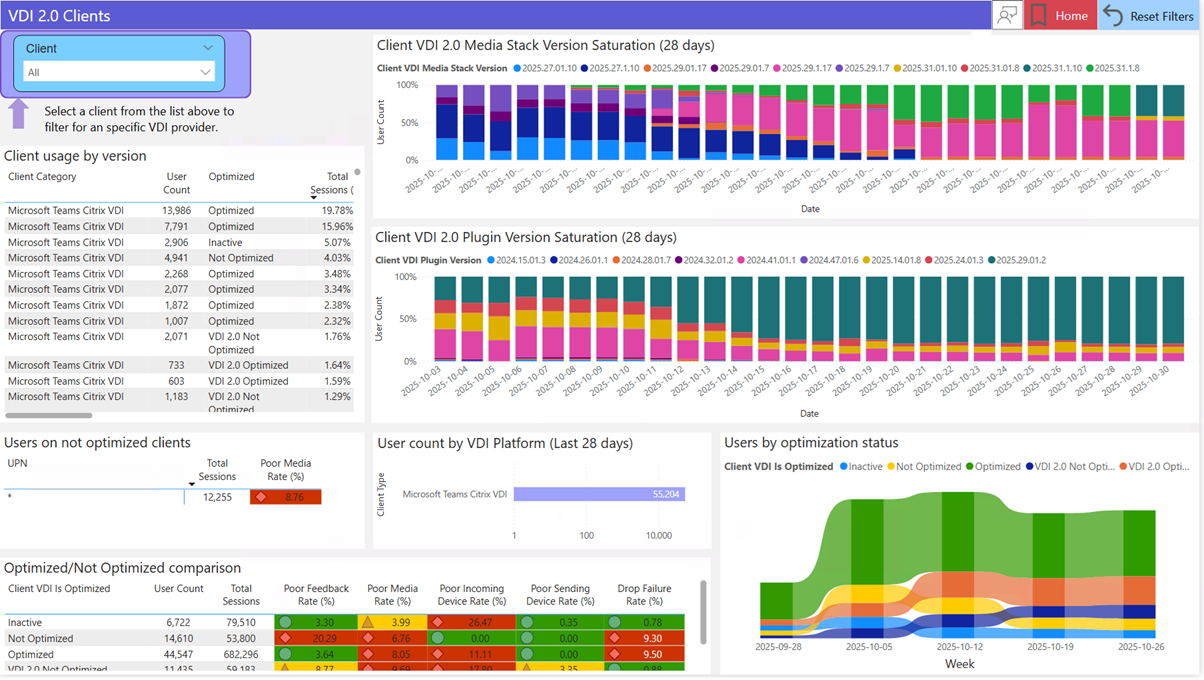
- Monitor adoption using:
- Teams Admin Center
- Call Quality Dashboard (CQD)
- Power BI VDI reports (template)
- Communicate this change to:
- Helpdesk and support teams
- End users who rely on Teams in VDI
- Update internal documentation referencing Citrix HDX or AVD/W365 WebRTC optimization.
Learn more:
[Compliance considerations]
| Compliance area | Explanation |
|---|---|
| Admin monitoring and reporting | SlimCore improves visibility and diagnostics through Teams Admin Center and Call Quality Dashboard, changing how admins monitor media quality in VDI environments. |
All other compliance areas reviewed (data storage, AI/ML usage, Purview capabilities, GDPR data subject rights, third‑party integrations, admin controls, and user self‑service) are not impacted by this change.
More information
- docs.citrix.com/en-us/citrix-virtual-apps-desktops/policies/reference/ica-policy-settings/multimedia-policy-settings#microsoft-teams-redirection
- learn.microsoft.com/microsoftteams/vdi-2#cross-cloud-collaboration
- learn.microsoft.com/microsoftteams/vdi-2
- learn.microsoft.com/microsoftteams/vdi-2#call-quality-dashboard-in-vdi
Details
Services
- Teams
Category
- Plan for change
Microsoft tags
- User Adoption
- Admin Action
- Retirement