MC1238432 Microsoft 365 Copilot app: Branded footer customization
Primary service: M365 Copilot
ChangePilot summary
- New co-branding capability allows organizations to display a branded footer in the Microsoft 365 Copilot app.
- Admins can upload their organization’s logo to customize the footer for users.
- The footer will include an “Approved by [Logo]” indicator for user verification of the organization-approved environment.
- The feature will be off by default and requires admin configuration to enable.
- Admins need to verify their theme configuration and upload their logo once the feature is available.
Latest update: Description updated to include - Admins can choose a footer label: Approved by, Provided by, or Managed by. Selecting No label will display the logo without a label
History
Recorded changes
- Description updated to include - Admins can choose a footer label: Approved by, Provided by, or Managed by. Selecting No label will display the logo without a label
- The timeline for the rollout has been updated, with the start now scheduled for mid-July 2026 instead of the end of June 2026, and completion expected by the end of July 2026 instead of early July 2026.
- The timeline for the rollout has been updated, with the start now scheduled for mid-July 2026 instead of the end of June 2026, and completion expected by the end of July 2026 instead of early July 2026.
- The timeline for the rollout of the co-branding capability has been updated: The rollout began at the end of June 2026 instead of the previously planned early May 2026, and is expected to complete by early July 2026 instead of mid-June 2026.
- The timeline for the rollout of the co-branding capability has been updated: The rollout began at the end of June 2026 instead of the previously planned early May 2026, and is expected to complete by early July 2026 instead of mid-June 2026.
- The completion date for the General Availability (Worldwide) rollout has changed from end of May 2026 to mid-June 2026.
- The completion date for the General Availability (Worldwide) rollout has changed from end of May 2026 to mid-June 2026.
- The timeline for the rollout of the co-branding capability has been updated; it will now begin in early May 2026 instead of late March 2026, and complete by the end of May 2026 instead of late April 2026.
- The timeline for the rollout of the co-branding capability has been updated; it will now begin in early May 2026 instead of late March 2026, and complete by the end of May 2026 instead of late April 2026.
Microsoft message
Updated September 17, 2026: We have updated the content. Thank you for your patience.
[Introduction]
We’re introducing a new co-branding capability that will allow organizations to display a branded footer at the bottom of the Chat screen in the Microsoft 365 Copilot app. This update will enable admins to add their organization’s logo to their users’ Microsoft 365 Copilot app, helping users confirm they are using their trusted, work-managed Copilot experience.
This message is associated with Microsoft 365 Roadmap ID 555852.
[When this will happen]
- General Availability (Worldwide): We will begin rolling out August 2026 (previously mid-July) and is expected to complete by mid-September 2026 (previously end of July).
[How this will affect your organization]
Who is affected
- All Microsoft 365 tenants using the Microsoft 365 Copilot app.
What will happen
- Admins will be able to upload a logo in the Microsoft 365 admin center to customize the footer in the Microsoft 365 Copilot app.
- The footer will use the same logo configured in your organization’s theme for other Microsoft 365 apps. Only the logo will be used; other theme settings will not apply in this release.
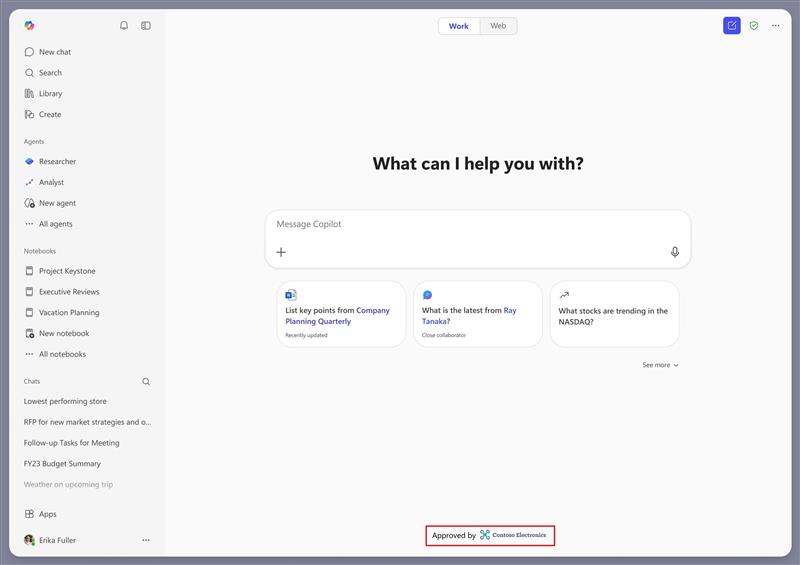
- Admins can choose a footer label: Approved by, Provided by, or Managed by. Selecting No label will display the logo without a label.
- This feature will be off by default and will require admin configuration.
- There will be no user impact unless an admin enables the footer.
[What you can do to prepare]
No action will be required unless you want to enable the branded footer.
Admins who want to configure this feature should:
- In the Microsoft 365 admin center, go to Org settings > Custom theme and open your default theme.
- Confirm that your organization’s logo is configured in the Logos tab. This is the same logo used for your organization’s branding in other Microsoft 365 apps.
- Open the Copilot Chat tab and select Add your brand to Copilot Chat footer area.
- In the Footer style dropdown, choose No label, Approved by, Provided by, or Managed by.
- Save your changes to display your logo in the branded footer in the Microsoft 365 Copilot app.
Please note: The footer currently uses your organization's default theme and applies to all users. Targeting different logos to specific user groups will be supported in a later update.
For configuration guidance: Customize the theme for your organization | Microsoft 365 | Microsoft Learn
[Compliance considerations]
No compliance considerations identified. Review as appropriate for your organization.
More information
Details
In weekly changes
Platforms
- Android
- Desktop
- iOS
- Mac
- Web
Services
- M365 Copilot
Category
- Stay informed
Microsoft tags
- New Feature
- User Adoption
- Admin Action
Related changes
- 555852 Branded footer in the Microsoft 365 Copilot app Roadmap · M365 · Launched