MC1234571 Microsoft Purview | Data Loss Prevention - Adaptive scopes for DLP for SharePoint
Primary service: Purview
ChangePilot summary
- Adaptive scopes in SharePoint DLP policies will automatically target sites based on site attributes, reducing manual updates.
- Admins can create adaptive scopes to efficiently apply DLP policies across SharePoint sites as they change.
- This feature requires admin action to set up; it is not enabled by default.
- There is no impact on user workflows, ensuring a seamless experience for end-users.
- Admins need to verify licensing and permissions to use adaptive scopes effectively.
Latest update: Image URL Change
History
Recorded changes
-
- Standard start: early January 2027 (previously late August 2026).
- Standard end: late January 2027 (previously late September 2026).
- The timeline for General Availability has been delayed from early June 2026 to late August 2026, and completion from the end of June 2026 to late September 2026.
- The updated timeline now states that General Availability (Worldwide) will begin rollout in early June 2026 and is expected to complete by the end of June 2026, whereas previously it was mid-April to late April.
- The general availability rollout will now begin mid-April 2026 and complete late April 2026, instead of mid-March 2026 and late March 2026 as previously stated.
Microsoft message
Updated August 27, 2026: We have updated the timeline. Thank you for your patience.
[Introduction]
Adaptive scopes for SharePoint DLP policies in Microsoft Purview enable you to target SharePoint sites based on site attributes instead of manually maintaining static site lists. As sites are created or updated, adaptive scopes automatically adjust membership, ensuring that DLP policies remain aligned to your environment without ongoing manual updates.
This message is associated with Microsoft 365 Roadmap ID 549288.
[When this will happen]
- Public Preview: We began rollout in early February 2026 and expect to complete by late‑February 2026.
- General Availability (Worldwide): We will begin rollout in early January 2027 (previously late August 2026) and expect to complete by late January 2027 (previously late September).
[How this will affect your organization]
Who is affected: Admins who manage Data Loss Prevention (DLP) policies for SharePoint in Microsoft Purview.
What will happen:
With adaptive scopes for SharePoint, your organization will -
- Apply DLP policies more efficiently and at scale.
- Automatically target the correct SharePoint sites based on attributes such as URL, name, or metadata.
- Ensure new or updated sites are protected without manual list maintenance.
- Reduce administrative overhead by removing the need to maintain static site lists.
- Maintain consistent DLP policy coverage as your SharePoint environment grows and changes.
Additional notes:
- There is no impact to user workflows.
- The feature is not enabled by default; admins must create and assign adaptive scopes.
[What you can do to prepare]
To prepare for this update, you can:
- Verify licensing and permissions.
- Ensure your tenant has Microsoft 365 E5 or E5 Compliance licensing and that you hold the required Purview roles.
- Learn more: Configure adaptive scopes - Adaptive Scopes | Microsoft Purview | Microsoft Learn
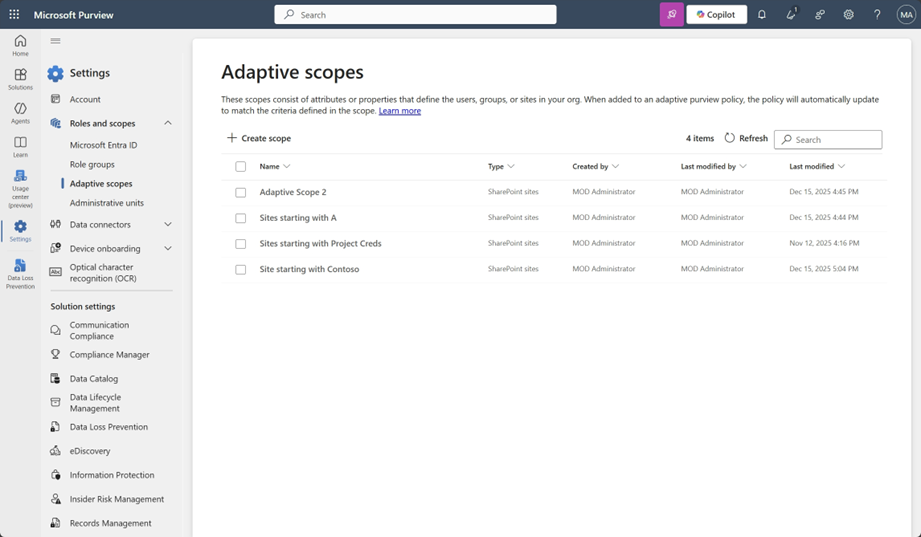
- Navigate to Adaptive scopes.
- Go to Microsoft Purview compliance portal → Settings → Roles & scopes → Adaptive scopes (screenshot 1):
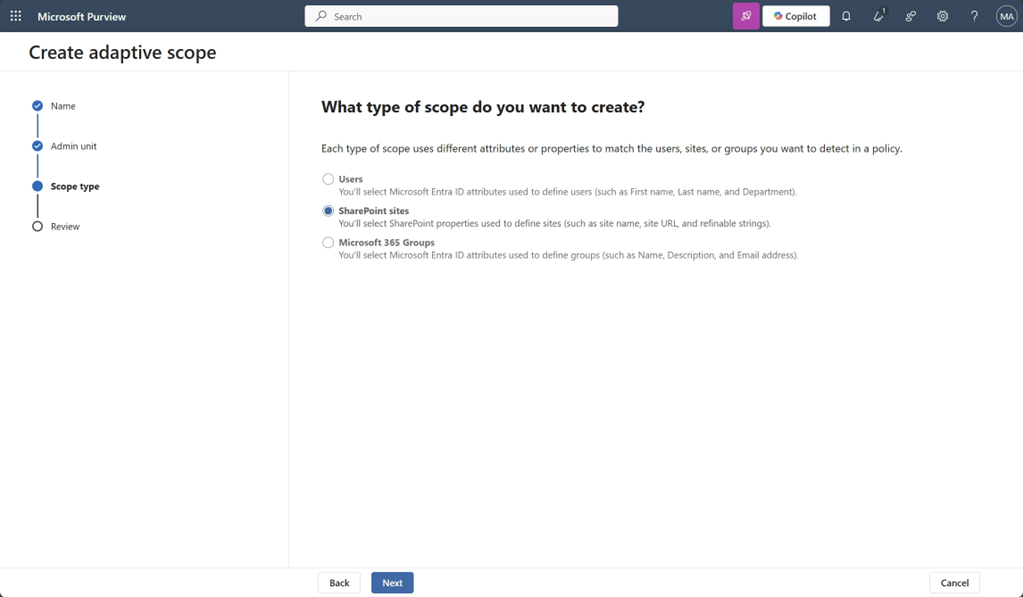
- Create an adaptive scope.
- Select + Create scope.
- Provide a name and description.
- Choose SharePoint sites as the scope type (screenshot 2):
- Define the scope criteria.
- Use the query builder to set rules based on SharePoint site attributes such as:
- Site URL
- Site name
- Custom metadata
- Review and create the scope.
- Confirm your criteria and create the scope. The system evaluates and updates scope membership automatically.
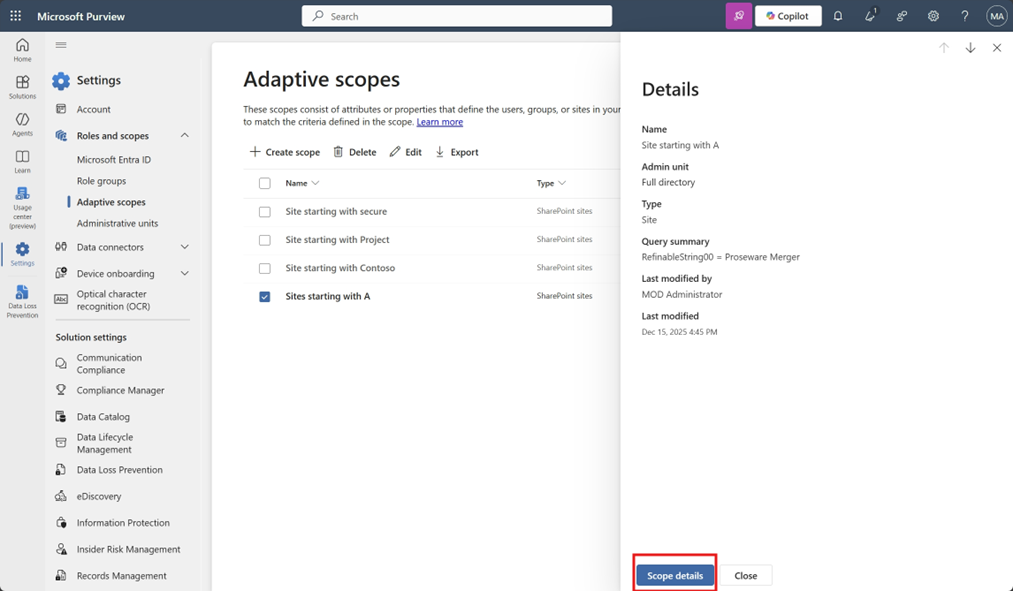
- Verify scope membership.
- Review included sites using the Adaptive scopes details pane (screenshot 3):
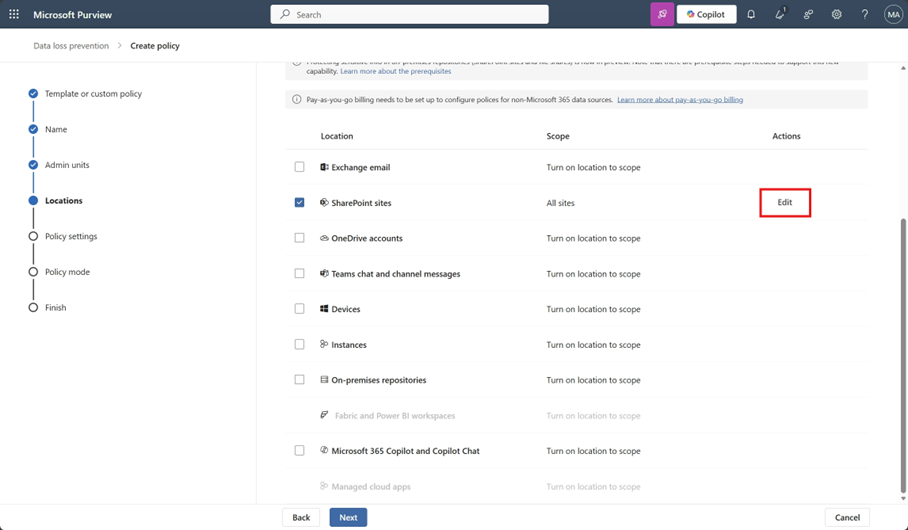
- Apply the scope to a DLP policy.
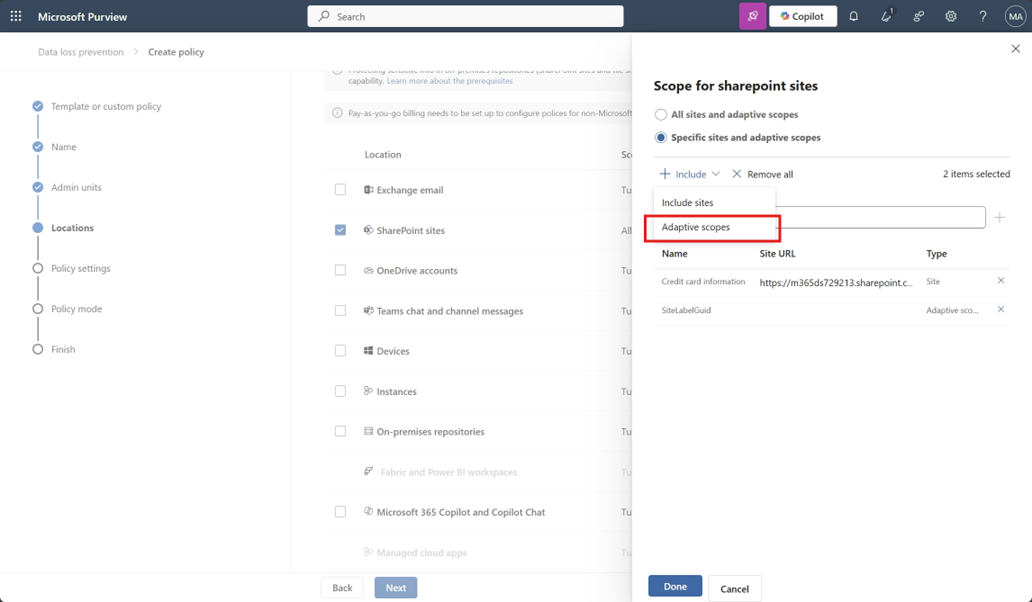
- When creating or editing a SharePoint DLP policy, select your adaptive scope (screenshots 4 and 5):
.
- Allow time for periodic evaluation.
- Changes to adaptive scopes may take time to reflect across applied policies.
[Compliance considerations]
No compliance considerations identified. Review as appropriate for your organization.
More information
Details
Platforms
- Web
Services
- Purview
Category
- Stay informed
Microsoft tags
- New Feature
- User Adoption
- Admin Action
Related changes
- 549288 Data Loss Prevention- Adaptive Scopes for DLP for SharePoint Roadmap · Purview · In development