MC1193692 Enrich profile cards with custom properties from third-party systems
Primary service: M365
ChangePilot summary
- Organizations can customize Microsoft 365 profile cards by adding up to 10 custom properties from external systems.
- Admins can configure visibility, display name, and icon for each property through the Microsoft 365 admin center.
- Properties will display in the Contact Information section of profile cards in Outlook Web once enabled.
- Changes may take up to 24 hours to appear across profile cards.
- Future updates will include connectors for direct ingestion from SAP SuccessFactors and Workday.
Latest update: Standard start: early January 2027 (previously November 2026). Standard end: early January 2027 (previously November 2026).
History
Recorded changes
-
- Standard start: early January 2027 (previously November 2026).
- Standard end: early January 2027 (previously November 2026).
-
- Standard start: November 2026 (previously October 2026).
- Standard end: November 2026 (previously October 2026).
-
- Standard start: October 2026 (previously September 2026).
- Standard end: October 2026 (previously September 2026).
- The general availability rollout timeline has been postponed from July 2026 to September 2026.
- The timeline for the rollout of the feature has been updated from starting and completing in June 2026 to starting and completing in July 2026.
- The timeline for the rollout of the feature has been updated from starting and completing in June 2026 to starting and completing in July 2026.
-
- The timeline for the rollout of the feature has been updated from March 2026 to June 2026.
- The completion of the rollout has similarly been changed from March 2026 to June 2026.
-
- The timeline for the rollout of the feature has been updated from mid-January to March 2026.
- The completion date for the rollout has changed from late January to March 2026.
Microsoft message
Updated November 6, 2026: We have updated the timeline. Thank you for your patience.
We’re introducing the ability for organizations to customize Microsoft 365 profile cards by adding up to 10 custom properties sourced from external systems such as HR platforms. This enhancement helps enrich user profiles with relevant organizational details, improving discoverability and context for collaboration.
This message is associated with Microsoft 365 Roadmap ID 529851.
When this will happen:
General Availability (Worldwide): We will begin rolling out in January 2027 (previously November 2026) and expect to complete in January 2027 (previously November 2026).
How this affects your organization
Who is affected: Microsoft 365 tenant admins managing user profile cards
What will happen:
- You can add up to 10 custom properties to profile cards using Microsoft Graph People connectors.
- Properties can be sourced from external systems (such as HR platforms).
- This feature is OFF by default and requires admin configuration to enable.
- Admins can configure visibility, display name, and icon for each property in Microsoft 365 admin center under: Settings > Org settings > People settings > Profile > Person info on profile cards
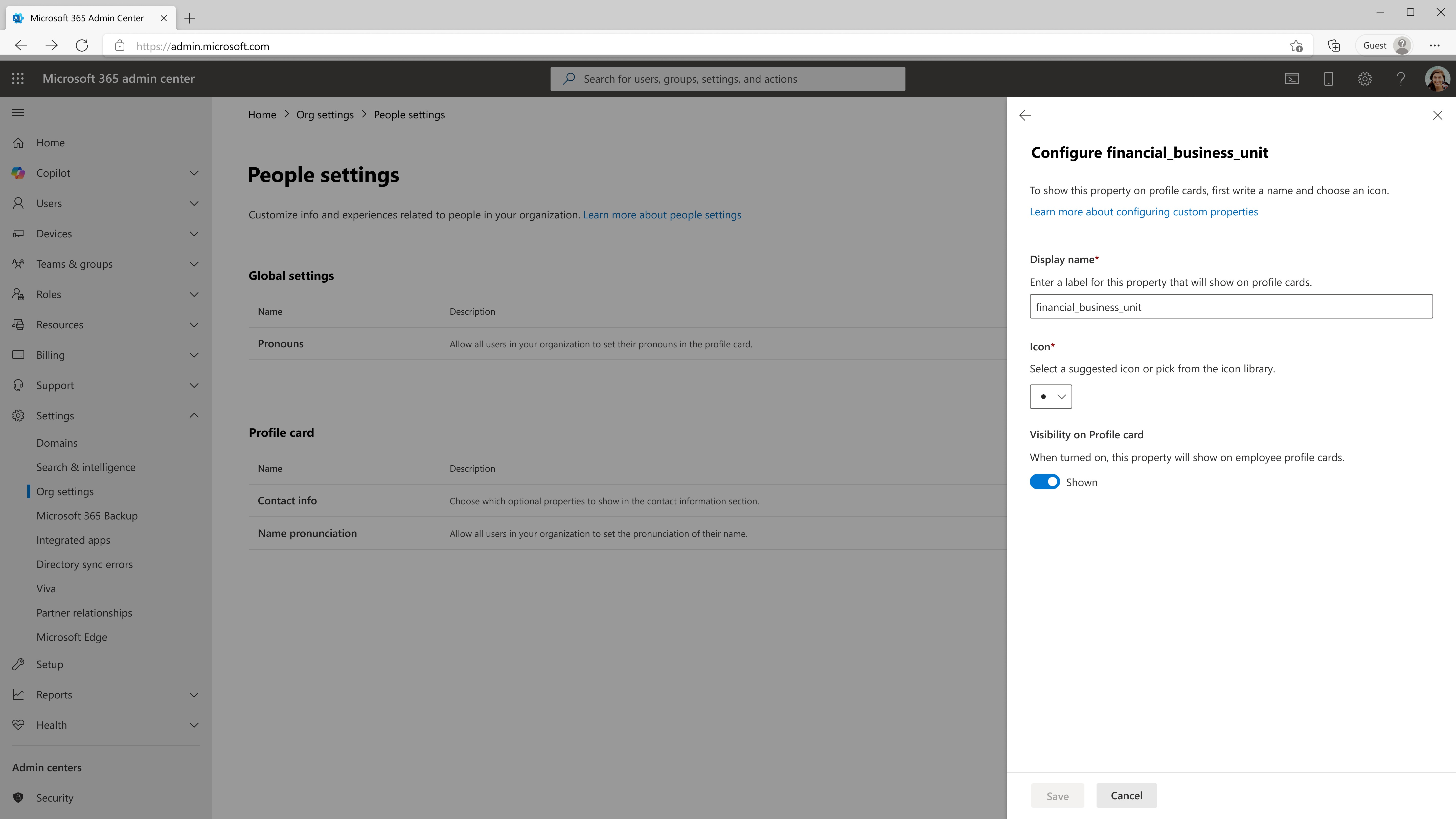
- Once enabled, properties appear in the Contact Information section of profile cards in Outlook Web:
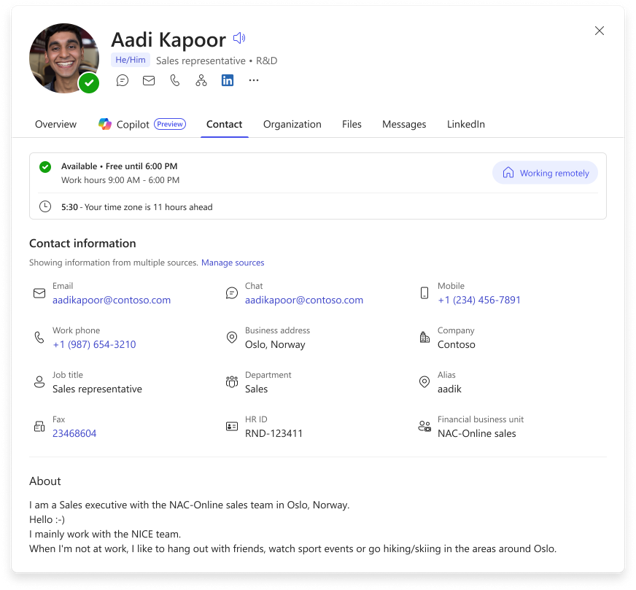
- Changes may take up to 24 hours to propagate across profile cards.
- Future updates will include direct ingestion from SAP SuccessFactors and Workday connectors.
What you can do to prepare
- Review external systems for properties you want displayed on profile cards.
- Ingest these properties using a Microsoft Graph People connector.
- Configure visibility and enable properties in the Microsoft 365 admin center.
- Communicate this change to helpdesk staff and update internal documentation if needed.
Learn more: Microsoft 365 Copilot connectors for people data | Microsoft Learn
Compliance considerations
No compliance considerations identified. Review as appropriate for your organization.
More information
Details
In weekly changes
Platforms
- Web
Services
- M365
Category
- Stay informed
Microsoft tags
- New Feature
- User Adoption
- Admin Action
Related changes
- 529851 Enriching profile cards with custom, organization-specific properties Roadmap · Outlook · In development