MC1183611 Consult and merge into a meeting or group call via Dual-Tone Multi-Frequency (DTMF)
Primary service: Teams
ChangePilot summary
- Microsoft Teams will allow users to consult and merge PSTN callers into active meetings, including those behind IVR systems.
- A new interface will provide a dialpad for navigating IVR systems using DTMF tones.
- Users can bring external parties into meetings seamlessly.
- No administrator action is required; feature enabled by default.
- This change impacts all Teams users managing meetings with PSTN participants.
Latest update: Image URL Change
History
Recorded changes
- The completion date for General Availability rollout has been extended from late April 2026 to mid-June 2026.
- The completion date for General Availability rollout has been extended from late April 2026 to mid-June 2026.
-
- The targeted release timeline has been changed from early March - mid-March 2026 to early April - mid-April 2026.
- The general availability timeline has been updated from late March - early April 2026 to mid-April - late April 2026.
-
- The targeted release timeline has been changed from early March - mid-March 2026 to early April - mid-April 2026.
- The general availability timeline has been updated from late March - early April 2026 to mid-April - late April 2026.
-
- The timeline for the rollout has shifted; the Targeted Release is now rolling out early March instead of early February and is expected to complete by mid-March instead of mid-February.
- General Availability is now rolling out late March, instead of mid-February, and is expected to complete by early April 2026, instead of the end of February.
-
- The timeline for the feature rollout has been updated. Targeted Release is now scheduled for early February 2026, completing by mid-February 2026.
- General Availability will begin in mid-February 2026 and is expected to complete by the end of February 2026. Previously, both phases were scheduled for January 2026.
Microsoft message
Updated May 18, 2026: We have updated the timeline. Thank you for your patience.
[Introduction]
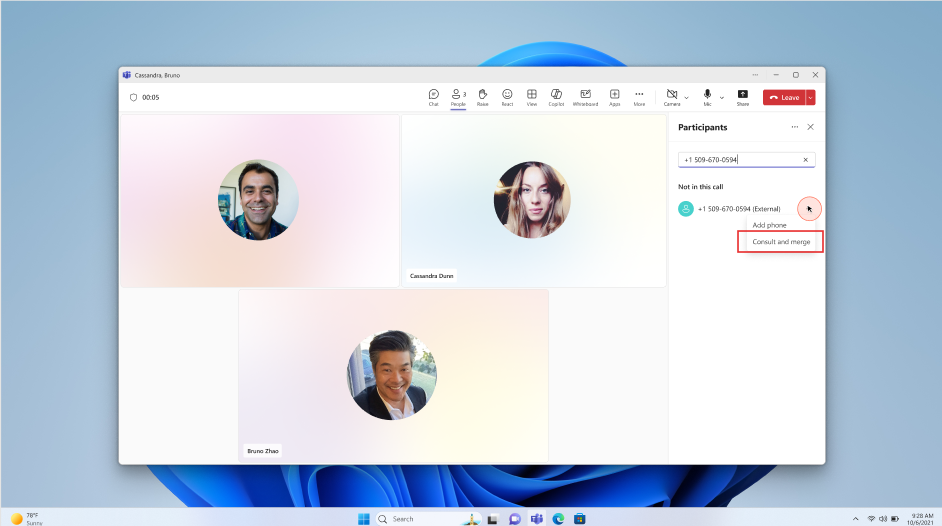
To improve collaboration and streamline meeting workflows, Microsoft Teams is introducing the ability to consult and merge Public Switched Telephone Network (PSTN) callers into active meetings—even when those callers are behind auto-attendants or Interactive Voice Response (IVR) systems that require Dual-Tone Multi-Frequency (DTMF) navigation. This enhancement allows users to reach subject matter experts via dial-in and seamlessly bring them into the broader conversation.
This message is associated with Microsoft 365 Roadmap ID 518218.
[When this will happen:]- Targeted Release: Rolling out early April 2026 (previously early March), expected to complete by mid-April 2026 (previously mid-March).
- General Availability: Rolling out mid-April 2026 (previously late March), expected to complete by mid-June 2026 (previously late April).
[How this affects your organization:]
- Who is affected: All Microsoft Teams users who initiate or manage meetings with PSTN participants. Administrators overseeing Teams meeting policies and call configurations.
- What will happen:
- Users can consult with PSTN or Voice over Internet Protocol (VoIP) participants via the Participants panel.
- A new interface will allow users to access a dialpad to navigate IVR systems and auto-attendants using DTMF tones.
- Once the external party is reached, users can merge them into the ongoing meeting.
- No changes to existing administrator policies; feature is enabled by default.
[What you can do to prepare:]
- No administrator action is required for this rollout.
- If your organization uses custom training or helpdesk documentation, consider updating it to reflect this new capability.
- Before rollout, we will update this post with new documentation.
[Compliance considerations:]
No compliance considerations identified, review as appropriate for your organization.
More information
Details
Services
- Teams
Category
- Stay informed
Microsoft tags
- New Feature
- User Adoption
Related changes
- 518218 Consult and merge a PSTN caller through DTMF Roadmap · Teams · Launched