MC1182705 Microsoft Teams Rooms: Room health signals in Teams Rooms on Windows
Primary service: Teams
ChangePilot summary
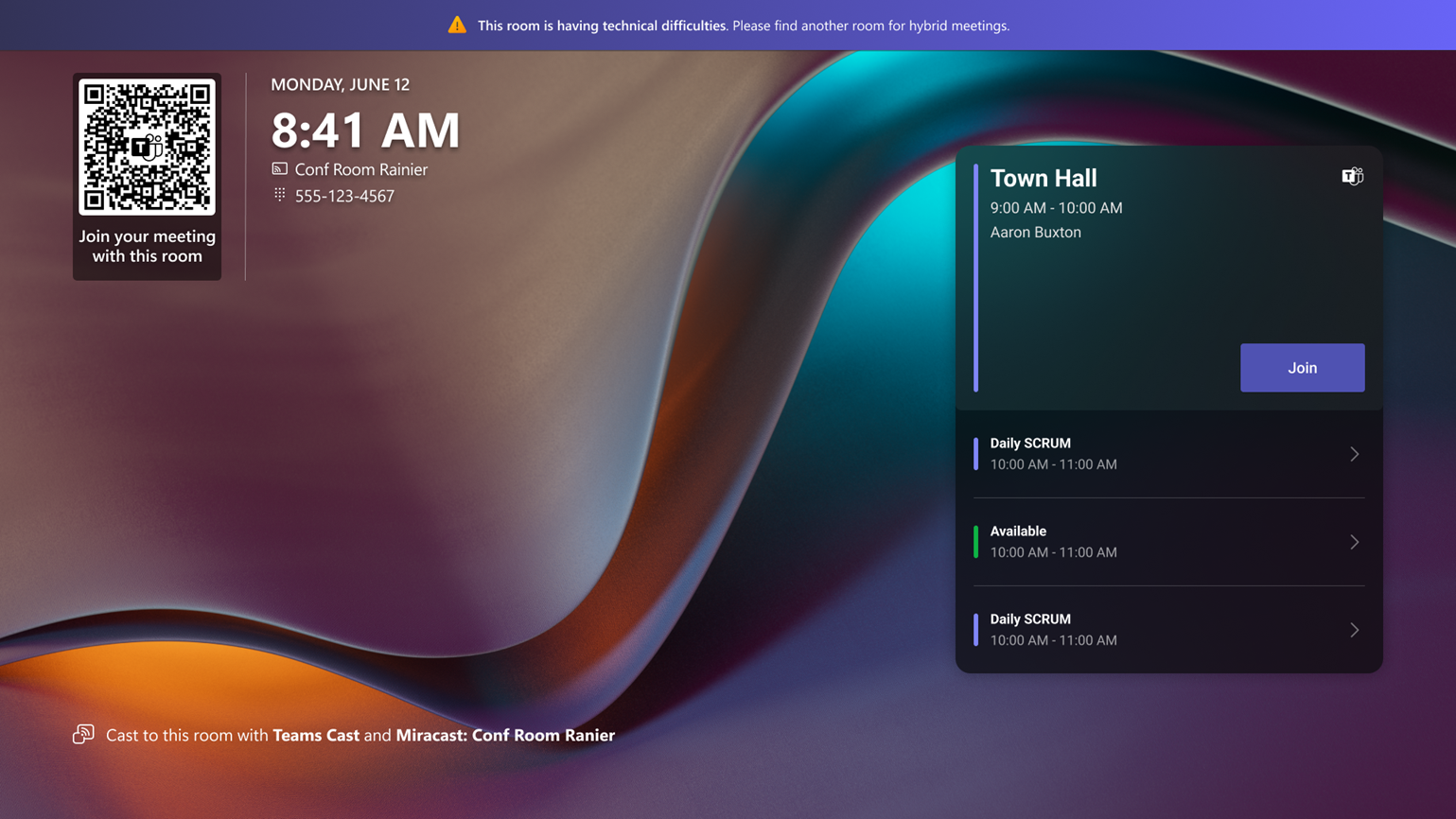
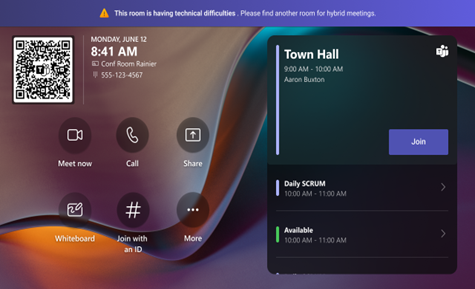
- Teams Rooms on Windows will now show alert banners for critical or important issues impacting room functionality.
- Alerts will be visible on both the front-of-room display and console.
- This feature is enabled by default for Teams Rooms Pro license holders with app version 5.5 or newer.
- If detected issues occur, users will be advised to find an alternative nearby room.
- Administrators should review health signal documentation and prepare by monitoring the Pro Management portal and updating training materials as necessary.
Latest update: Image URL Change
History
Recorded changes
- The rollout completion date for the DoD environment has been delayed from mid-July 2026 to early August 2026.
- The rollout completion date for the DoD environment has been delayed from mid-July 2026 to early August 2026.
-
- The timeline for the rollout of alert banners in Teams Rooms has been postponed by about a month from the initial schedule across all environments: Worldwide, GCC, GCC High, and DoD.
- General Availability for Worldwide and GCC is now scheduled for mid-May to late May 2026, GCC High is mid-June 2026, and DoD is mid-July 2026.
- Worldwide and GCC rollout will now commence and complete in April 2026, instead of February 2026. GCC High rollout will shift to late April 2026, from previously late February. The timeline for DoD remains unchanged, beginning and completing in early June 2026.
-
- The timeline for the rollout of the alert banner feature in Teams Rooms on Windows has been updated. Worldwide and GCC rollouts are now scheduled for early to mid-February 2026, instead of December 2025.
- GCC High rollout is postponed to late February 2026, while DoD rollout is delayed until early June 2026.
Microsoft message
Updated July 28, 2026: We have updated the timeline. Thank you for your patience.
[Introduction]
To support a seamless hybrid meeting experience, Teams Rooms on Windows will now display alert banners when critical or important issues impact room functionality. These alerts appear on both the front-of-room display and the console, helping users quickly identify and respond to problems that may disrupt meetings. This feature will be available on Teams Rooms on Windows devices with Pro licenses.
This message is associated with Microsoft 365 Roadmap ID 508521.
[When this will happen]
General Availability:
- Worldwide: Rollout begins in mid-May 2026 (previously early April) and completes by late May 2026 (previously mid-April).
- GCC: Rollout begins in mid-May 2026 (previously early April) and completes by late May 2026 (previously mid-April).
- GCC High: Rollout begins and completes in mid-June 2026 (previously late April).
- DoD: Rollout begins and completes in early August 2026 (previously mid-July).
[How this affects your organization]
Who is affected: Organizations using Teams Rooms on Windows with Teams Rooms Pro licenses across commercial, GCC, GCC High, and DoD environments.
What will happen:
- Users will see alert banners on the front-of-room display and console when critical or important room health signals are detected.
- These alerts are based on existing signals defined in Health signals | Microsoft Teams | Microsoft Learn.
- The feature is enabled by default for supported versions of Teams Rooms on Windows with a Teams Rooms Pro license.
- This feature requires Microsoft Teams Rooms on Windows app version 5.5 or newer.
- If an issue is detected, users will be prompted to find another nearby room to maintain meeting continuity.
Screenshot 1: Front-of-room display view:
Screenshot 2: Console view:
[What you can do to prepare]
- Monitor the Pro Management portal regularly to anticipate potential issues.
- Respond promptly to alerts by verifying and resolving root causes.
- Communicate the new banner interface to users and update training materials as needed.
- Review the health signal documentation: Health signals | Microsoft Teams | Microsoft Learn.
[Compliance considerations]
No compliance considerations identified, review as appropriate for your organization.
More information
Details
Platforms
- Teams and Surface Devices
Services
- Teams
Category
- Stay informed
Microsoft tags
- Feature Update
- User Adoption
- Admin Action
Related changes
- 508521 Room health signals and notifications in Teams Rooms on Windows Roadmap · Teams · Launched