MC1058259 Preview changes before making them visible to attendees with "Manage what attendees see"
Primary service: Teams
ChangePilot summary
- New feature in Microsoft Teams allows organizers and presenters to preview attendee view changes before applying them during town hall events.
- "Manage what attendees see" is updated from a toggle to three radio button options: Off, On, and On with preview.
- The "On with preview" option is exclusive to town halls and does not require Teams Premium licenses.
- Changes focus on providing a more polished user experience, with smoother transitions between screen content for attendees.
- The update requires no action from admins, but users should be informed and encouraged to test the new feature.
Latest update: No material change.
History
Recorded changes
- The general availability completion date has been changed from early August 2025 to late September 2025.
- The general availability completion date has been changed from early August 2025 to late September 2025.
- The timeline for the rollout of the "Manage what attendees see" feature has been updated: the Targeted Release is now set for mid-July to late July 2025, and General Availability is now expected from late July to early August 2025.
- The timeline for the rollout of the "Manage what attendees see" feature has been updated: the Targeted Release is now set for mid-July to late July 2025, and General Availability is now expected from late July to early August 2025.
- The Targeted Release completion is now expected by late June 2025 (instead of late May 2025), and General Availability completion by late July 2025 (instead of late June 2025).
- The Targeted Release completion is now expected by late June 2025 (instead of late May 2025), and General Availability completion by late July 2025 (instead of late June 2025).
Microsoft message
Updated September 3, 2025: We have updated the timeline. Thank you for your patience.
Coming soon for Microsoft Teams: A new Manage what attendees see feature will help organizers and presenters deliver polished town hall events by simplifying the attendee view and keeping the focus on participants brought on screen. The new feature allows assigned organizers and presenters to preview changes before applying them all at once.
This message applies to Teams for Windows desktop, Teams for Mac desktop, and Teams for the web.
This message is associated with Microsoft 365 Roadmap ID 487431.
[When this will happen:]
Targeted Release: We will begin rolling out mid-July 2025 and expect to complete by late July 2025.
General Availability (Worldwide): We will begin rolling out late July 2025 and expect to complete by late September 2025.
[How this will affect your organization:]
Before this rollout, when an organizer or presenter brings a participant or shared content on or off screen, the change is immediately reflected in the attendees' view.
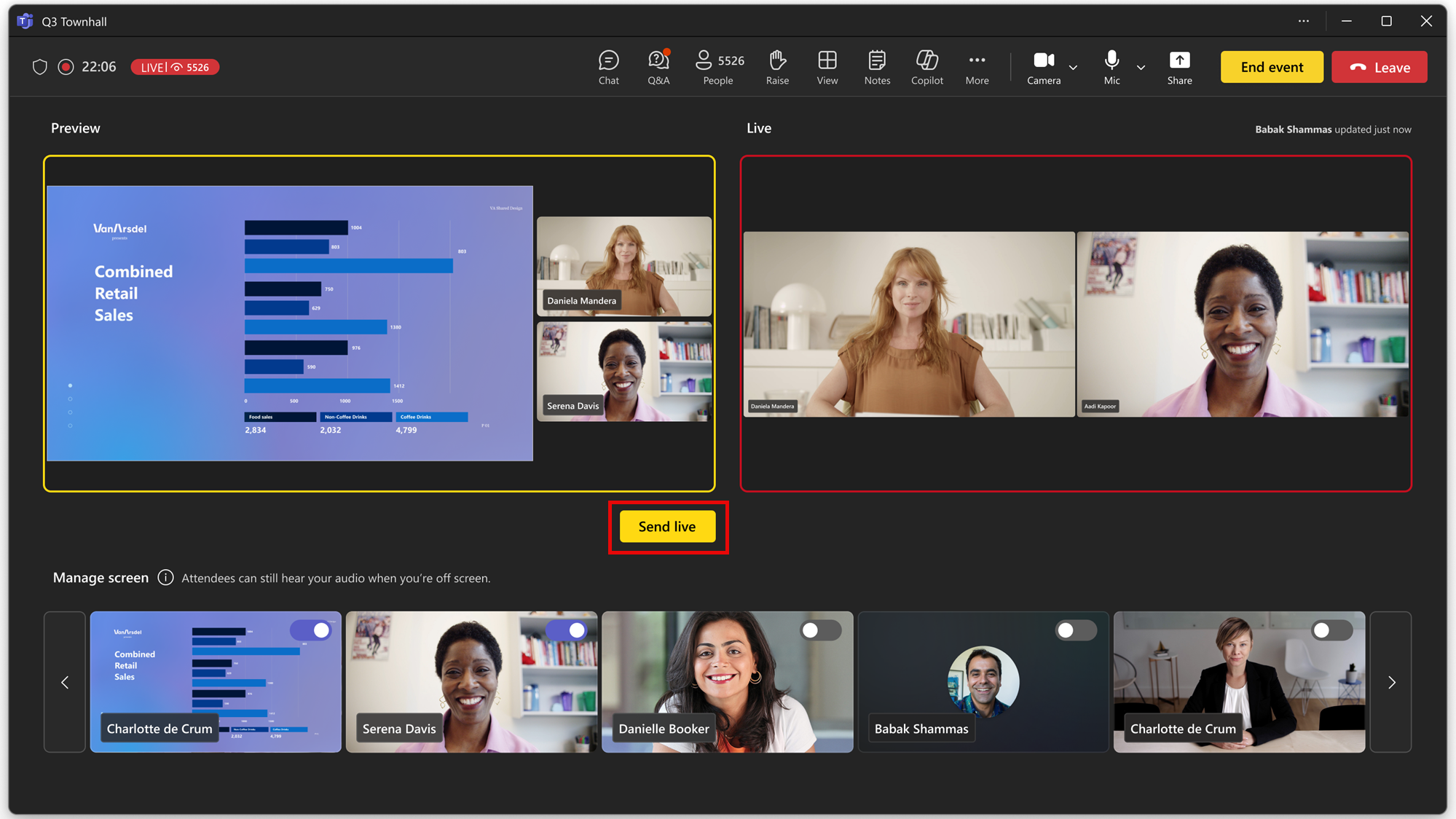
After this rollout, organizers and presenters will have the option to preview their changes before applying them. This allows for smoother, more polished transitions in the attendee's view, without showing every adjustment made by the organizer or presenter managing the screen. Organizers can go to the town hall Meeting options to locate the Manage what attendees see feature.
We will change the Manage what attendees see option from a toggle to radio buttons. Manage what attendees see will have three options:
- Off: All participants will appear onscreen.
- On: Organizers and presenters can share content and bring attendees on screen to view the content.
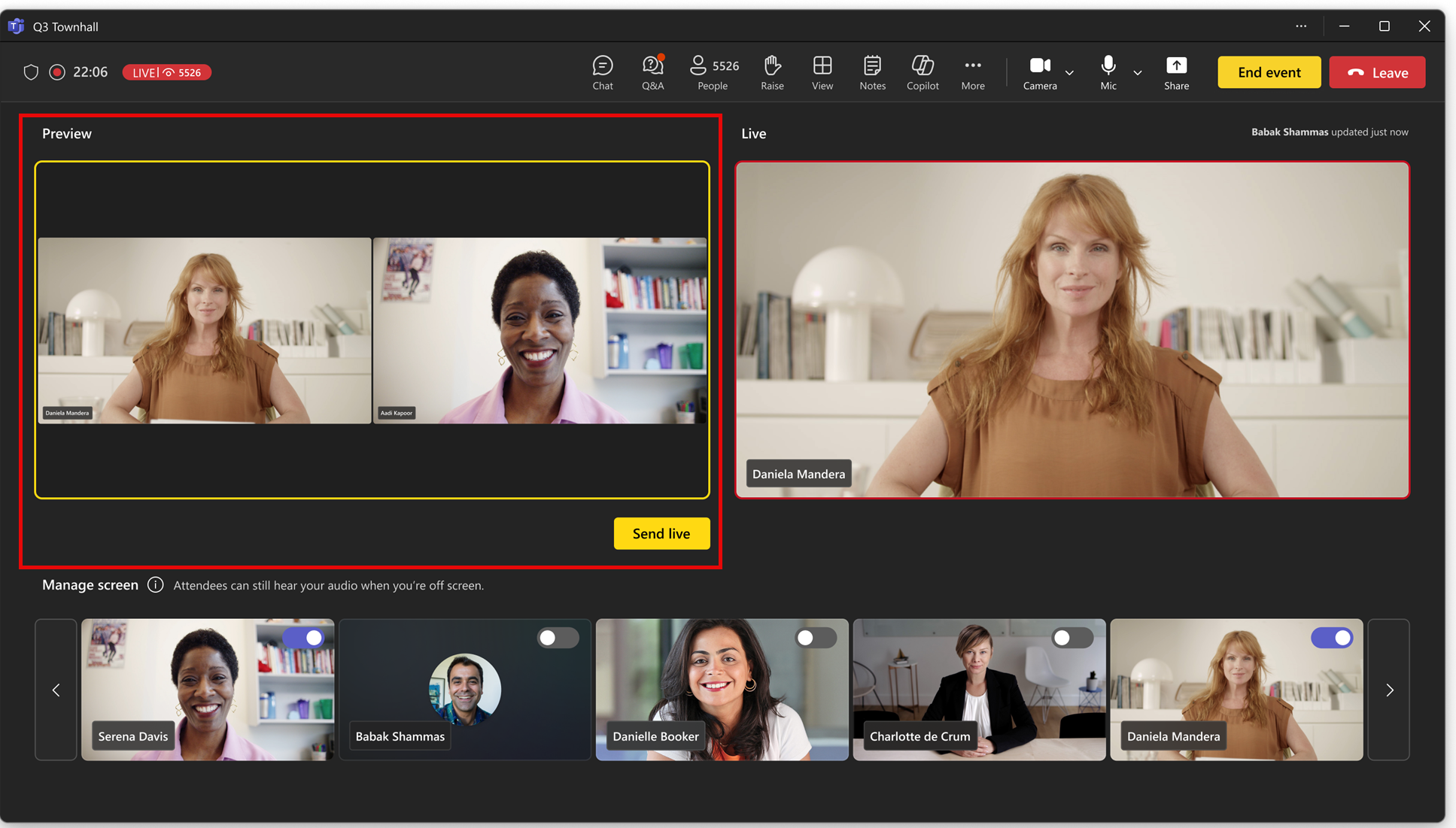
- On with preview: Organizers and presenters can share content, preview the content, and then bring attendees on screen to view the content.
To use the new On with preview option, the organizer must select it before the event begins. By default, Manage what attendees see is set to Off when scheduling a meeting or webinar, and On when scheduling a town hall. The On with preview option is only available for town halls and does not require a Teams Premium license.
Limitations
- The On with preview option is not available in meetings or webinars. For these events, the organizer will only have the option to select Off or On for Manage what attendees see.
- Only assigned users joining through Teams for Windows desktop or Teams for the web will have the option to preview and apply changes. Any assigned users joining through mobile or Microsoft Teams Room will not have the ability to bring participants or shared content on or off screen.
- Users joining through older Teams versions will continue to see the existing behavior, where users don't have the option to preview changes in Manage what attendees see.
Any new meetings or events created after mid-June 2025 will receive the new updates by default to the Manage what attendees see feature.
This feature will be available by default for meeting organizers to configure.
Select the presenter or content you’d like to preview before sending live to your event:
Select Send live to seamlessly send the content from the Preview window to the attendee view:
[What you need to do to prepare:]
This rollout will happen automatically by the specified dates with no admin action required before the rollout. You may want to notify your users about this change and update any relevant documentation.
We recommend you review Manage what attendees see in Teams meetings (will be updated before rollout) for a comprehensive overview of the feature and conduct a test session with the feature turned on to get acquainted with the new controls.
More information
Details
Platforms
- Desktop
- Mac
- Web
Services
- Teams
Category
- Stay informed
Microsoft tags
- Feature Update
- User Adoption