MC1058258 Specify who can manage the screen in town halls
Primary service: Teams
ChangePilot summary
- A new town hall meeting option called "Who has control of production tools" will allow organizers to designate individuals who can manage the screen during events.
- Only assigned users will have the ability to start, control, and end the event, while unassigned organizers, co-organizers, or presenters will still be able to join and present but cannot manage the screen.
- Event organizers can select specific roles for production tool control from three options: organizers, co-organizers, and presenters; organizers and co-organizers; or specific people.
- This feature is exclusive to town hall meetings and does not require a Teams Premium license.
- Users joining via older Teams versions will retain the previous ability for all organizers, co-organizers, and presenters to manage the screen.
Latest update: No material change.
History
Recorded changes
-
- The timeline for the targeted rollout has been updated to begin mid-May 2025 instead of late May 2025.
- The general availability timeline has been adjusted to start rolling out in late July 2025 and complete by early August 2025, instead of late May to early June 2025.
- The timeline for the "Targeted Release" has changed, with the rollout now beginning in late May 2025 (previously early May) and expected to complete by late May 2025 (previously mid-May).
- The timeline for the "Targeted Release" has changed, with the rollout now beginning in late May 2025 (previously early May) and expected to complete by late May 2025 (previously mid-May).
Microsoft message
Updated August 8, 2025: We have updated the timeline. Thank you for your patience.
Coming soon for Microsoft Teams: A new town hall meeting option called Who has control of production tools allows organizers to designate who can manage the screen during the event. Assigned individuals will be able to start the event, control what attendees see, and end the event, for a smoother, more organized experience.
This message applies to Teams for Windows desktop, Teams for Mac desktop, and Teams for the web.
This message is associated with Microsoft 365 Roadmap ID 487432.
[When this will happen:]
Targeted Release: We will begin rolling out mid-May 2025 and expect to complete by late May 2025.
General Availability (Worldwide): We will begin rolling out late July 2025 and expect to complete by early August 2025.
[How this will affect your organization:]
Before this rollout, organizers, co-organizers, and presenters can bring participants on or off screen and start or end the event. After this rollout, only assigned users will have the ability to perform these actions. Organizers, co-organizers, or presenters who are not assigned can still join the event and present but will be restricted from managing the screen or starting and ending the event. Presenters who are unassigned will not be able to manage assigned users with the options Make an attendee or Remove from meeting. A clapperboard icon will appear next to the names of participants who have been granted these permissions during the event.
In Town hall meeting options, event organizers can designate which roles have control over production tools at Details > Production tools:
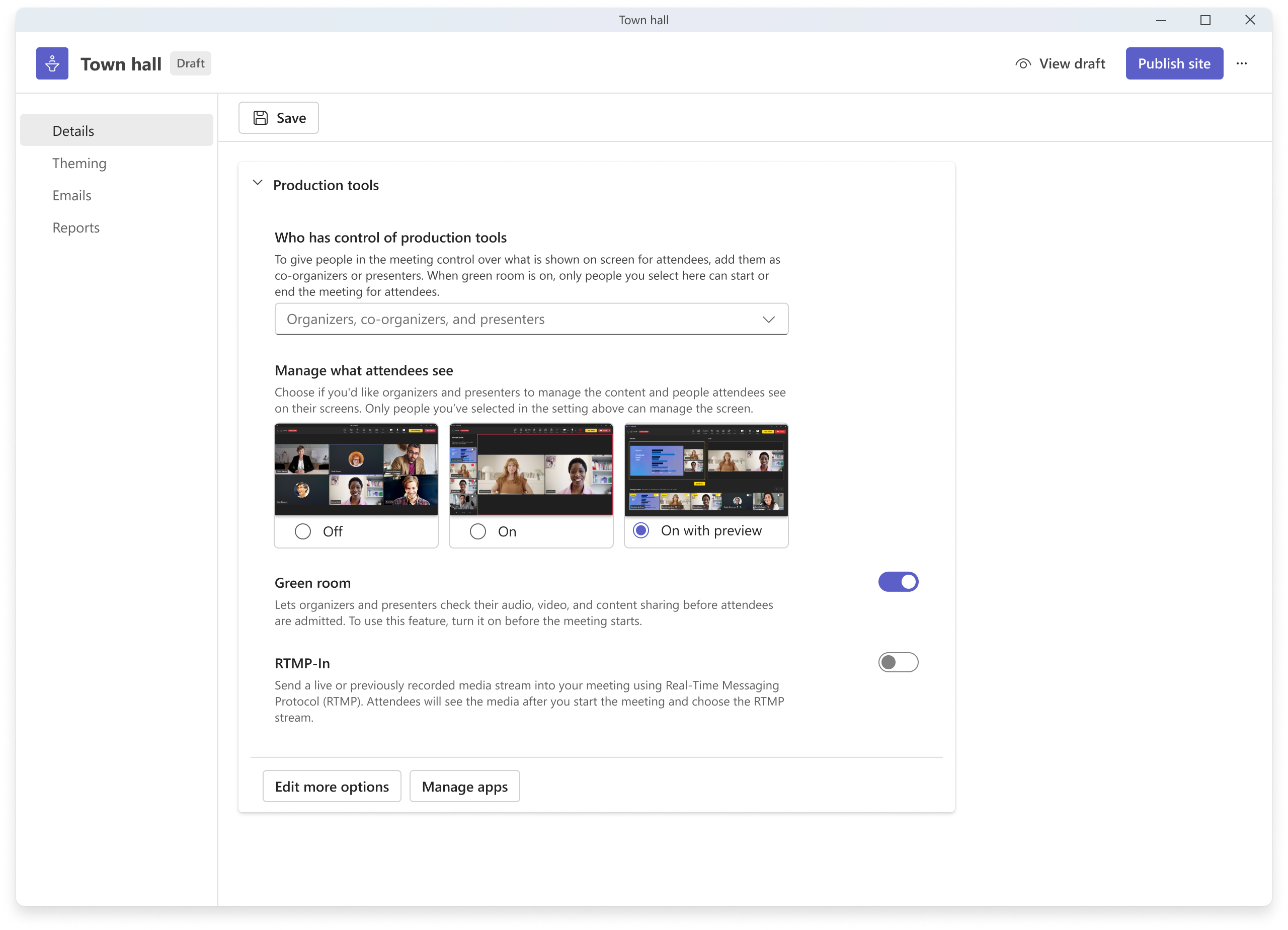
Who has control of production tools will have three options:
- Organizers, co-organizers and presenters: This is the default.
- Organizers and co-organizers
- Specific people
This meeting option is only available for town halls and does not require a Teams Premium license. We recommend the organizer set this option before the event starts.
Limitations
- Who has control of production tools is not available for meetings or webinars.
- Users joining through older Teams versions will continue to see the existing behavior, where all organizers, co-organizers, and presenters have the ability to manage the screen.
Any new events created or updated after late May 2025 will receive the new Who has control of production tools meeting option by default.
This feature will be available by default for meeting organizers to configure.
[What you need to do to prepare:]
This rollout will happen automatically by the specified date with no admin action required before the rollout. You may want to notify your users about this change and update any relevant documentation.
Before rollout, we will update this post with revised documentation.
Additional resources: Control town hall production tools in Microsoft Teams - Microsoft Support
More information
Details
Platforms
- Desktop
- Mac
Services
- Teams
Category
- Stay informed
Microsoft tags
- New Feature
- User Adoption